Podcast Shorts now link back to the full episode


On November 12, 2026, YouTube added Shorts creation from your own long videos to the "Clips" tool inside YouTube Studio, the creator dashboard for a channel. TeamYouTube, the platform's official support team, announced it in a YouTube Help Community post for podcast creators. The vertical crop isn't the main point here. The main point is a single link: a Short made with this tool automatically points to the full episode. Below I cover how things worked before, where the link goes missing, how to cut an episode by hand if AI suggestions aren't available in your country, and why, after YouTube's October changes, this is more than a convenience.
What changed on November 12, 2026 in the YouTube Studio "Clips" tool
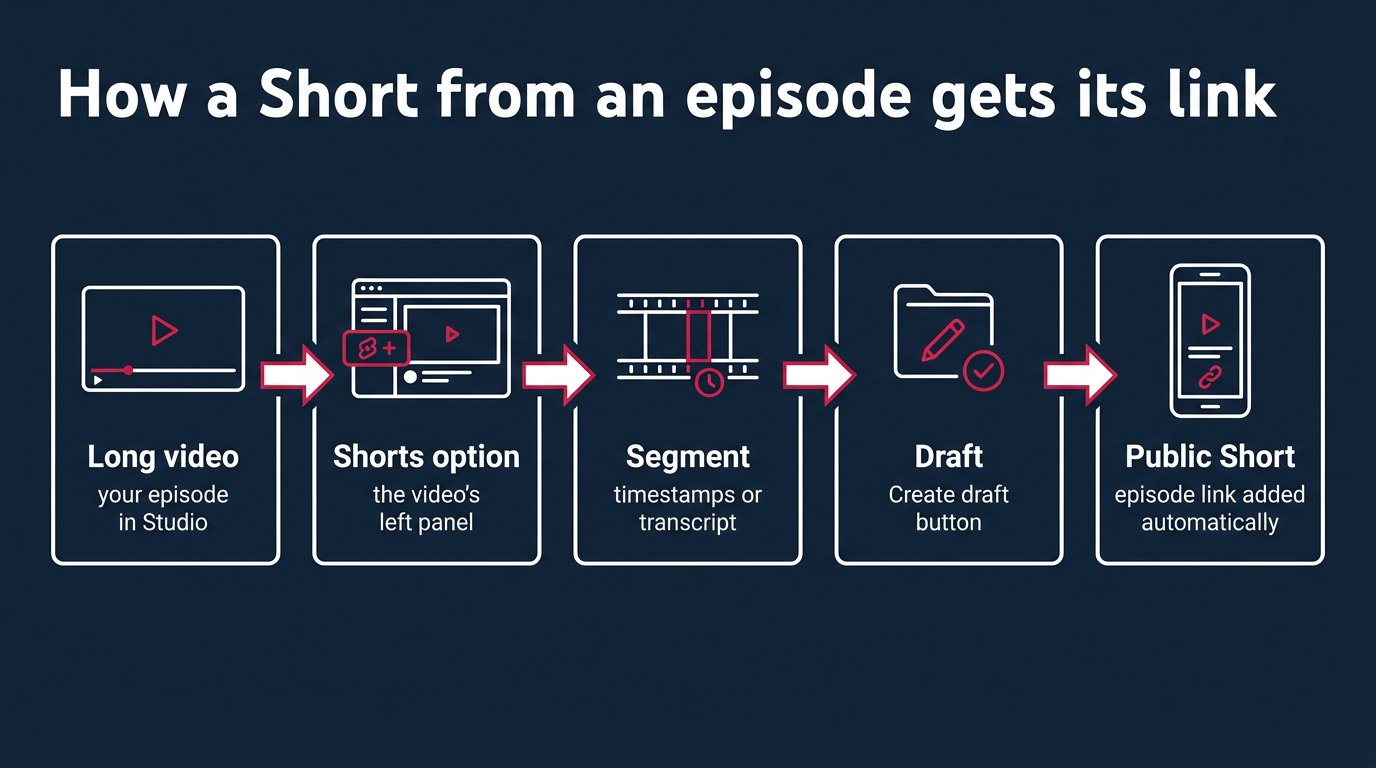
"Clips" used to be a tool for short excerpts inside a regular horizontal video. A viewer or the creator highlighted a segment, got a link to it, and the video stayed the same 16:9. Now the same tool has a Shorts option next to clips. You pick a segment of your long video, YouTube converts it to vertical, adds captions, and saves a draft Short.
This wasn't a surprise. In an April 2026 post, YouTube promised to release clips for Shorts "later this year." Judging by a copy in the Internet Archive, the help page for the tool described the Shorts option at least as early as September 10, 2026. So some channels may have seen the feature earlier, and on November 12 it was officially announced for podcast creators.
What the creator gets, according to YouTube:
- a horizontal 16:9 episode becomes a vertical video, with the most important parts kept in frame;
- captions are added automatically if they're available for the video; you can change the color, font, style, and position, or turn captions off entirely;
- the preview has a "Create draft" button, so the Short is saved as a draft first instead of being published right away;
- each such Short gets the source episode as its related video, and a clickable link to it sits under the channel name.
That last point is the news. Any mobile editor could do everything else 5 years ago.
How Shorts from long videos were made before November 12, 2026
The process went like this. Download your own episode. Cut a segment in CapCut or Premiere. Reframe so the speaker doesn't drift off the edge of the vertical frame. Burn in captions. Upload it as a new video. Then manually attach the full episode through the "Related video" field.
That last step is where a lot of people got stuck. According to YouTube's help page, you can only add a related video link to a self-uploaded Short after uploading, and only if you have access to advanced features. That's a separate access level on the account, you have to earn it, and a new channel may not have it. No access, no link. The Short lives on its own, collects views, and leads nowhere.
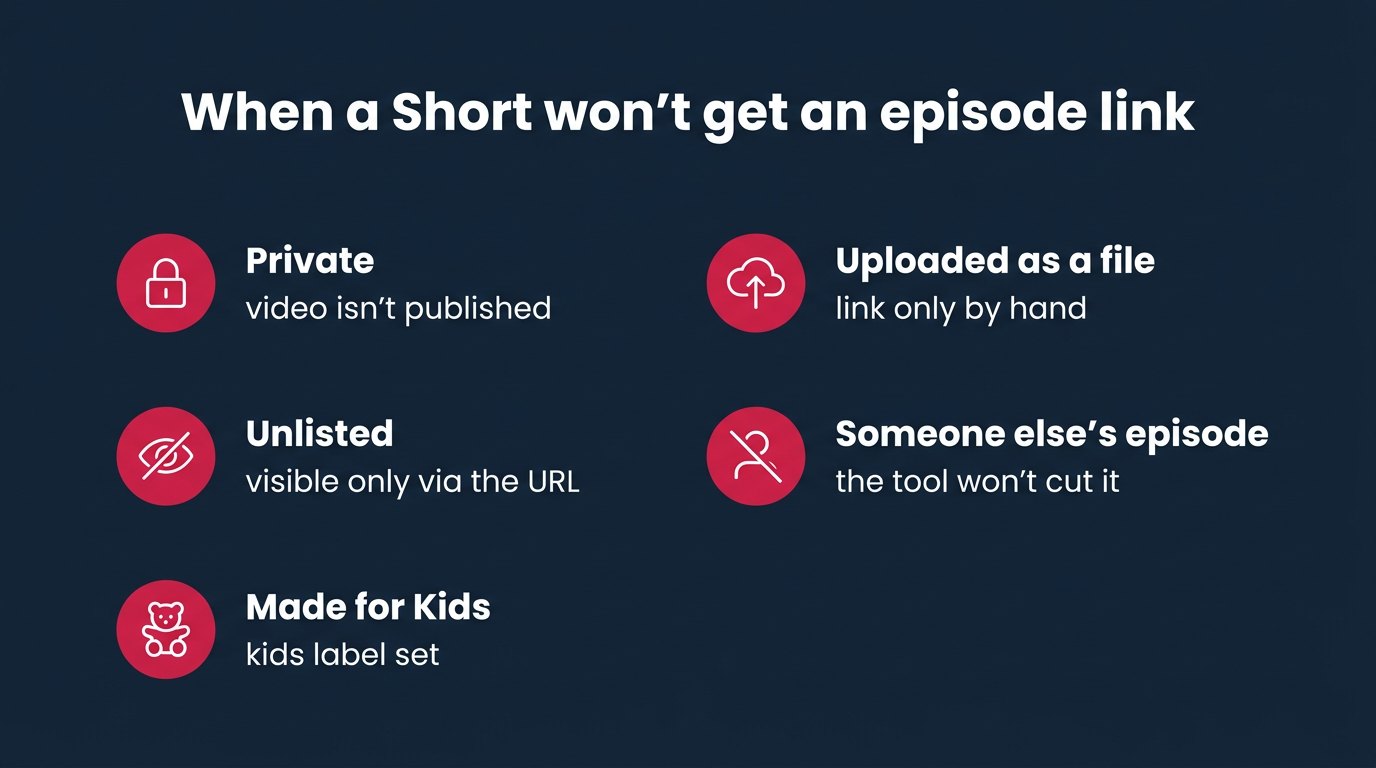
That path, by the way, still exists. If a Short is made in another editor and uploaded to YouTube as a file, everything works the old way: you add the link by hand, and you need that same access. Studio just added a second path where the link appears without those conditions.
Who the automatic episode link affects and who it doesn't
It affects people who have long videos on their channel and want viewers to move from the short video to the long one:
- podcasters whose video version lives on YouTube;
- people who post recordings of webinars, lectures, livestreams;
- interviews and talk shows;
- any long videos with segments that make sense without context.
It doesn't affect people who make Shorts from scratch: shot vertically on a phone, edited, uploaded. There's no source long video, so there's nothing to link. It also doesn't affect people who cut other creators' episodes. The tool works only with your own long video in your own Studio.
And a separate category: channels that lived on reuploads. On October 1, 2026, YouTube said it would reduce reach for channels that mostly compile or reupload other people's clips without significant changes. The November feature changes nothing for them. It's about something else: the creator cutting their own material, inside the platform, with a visible connection to the original.
How to make a Short from your episode in YouTube Studio, step by step
The path as YouTube describes it, nothing extra:
- Open YouTube Studio and go to "Content."
- Pick your long video and open its page.
- In the left panel, find the list of options, including "Clips" and "Shorts." Choose Short.
- Pick a segment in one of 2 ways: enter start and end timestamps in the timeline editor, or highlight a chunk of text in the video transcript.
- Check the vertical frame in the preview. YouTube says it keeps the most important parts in frame, but who matters most in the conversation is decided by the algorithm, not you.
- Adjust captions: color, font, style, position. Or turn them off if they get in the way.
- Click "Create draft." The Short is saved as a draft.
- Open the draft, check the title and visibility settings: "Public" and not "Made for Kids." Publish.
Where AI help is available, the left panel shows AI suggestions and a transcript outline, also generated by AI. According to YouTube, the system picks moments that can be watched separately from the episode, and the creator reviews and edits them. A suggestion never publishes anything on its own. The decision is yours.
Short from Studio, manually uploaded Short, and regular clip: a comparison
There are now 3 ways to make a short piece from an episode, and they behave differently. I put what YouTube's help page describes into a table.
| What | Short from Studio | Manually uploaded Short | Regular clip |
|---|---|---|---|
| Where it's made | Studio, video page | any editor, file upload | Studio, "Clips" option |
| Format | vertical | whatever you edit | same as source, 16:9 |
| Episode link | automatic, under the channel name | manual after upload | in the description, by hand |
| Needs access to advanced features | no | yes | no |
| When there's no link | private, unlisted, "Made for Kids" | until you add it | until you add it |
| AI suggestions | only in some countries | no | only in some countries |
The tool still makes regular clips. For those, the help page gives 2 tips: put a link to the source video in the description, and keep only full episodes in podcast playlists. The playlist tip matters more than it seems. A podcast playlist on YouTube works as an episode feed, and if 40-second clips sneak in between episodes, someone who came to listen straight through gets fragments.
How to cut an episode by hand if AI suggestions aren't available in your country
YouTube's help page lists the countries where AI suggestions work: Brazil, Canada, France, Germany, India, Mexico, South Korea, Spain, the United Kingdom. The list in the source is cut off, so if your country isn't in the visible part, assume the worst. YouTube says it's working on opening suggestions to more creators, with no date. So you pick the segments yourself.
Manual selection uses the same 2 methods, and they suit different episodes.
Timestamps work well if you already mark up your episodes. Many podcasters put chapters in the description: 00:00 intro, 04:12 money talk, 17:30 the argument. That's a ready-made map. Open a chapter, find where a complete thought sits inside it, and enter the start and end.
The transcript is better for conversational episodes without chapters. Reading is faster than watching. Skim the text, find the line that makes you want to say "whoa," and highlight from the start of the thought to its end. But YouTube generates the transcript, and in a conversation full of crosstalk it can come out messy. Before publishing, you still need to watch the segment, not just read it.
How long it takes. According to an estimate from Videotto, manually cutting a 60-minute episode in a third-party editor takes 3 to 5 hours. Of that, 60 to 90 minutes go to watching the recording to find segments, and 45 to 90 minutes go to the actual cutting. Studio removes the exporting, uploading, and linking from that work. Choosing the moment is still on you, and that's the most expensive part: no button speeds it up, only the habit of listening to your own episode with a pencil in hand.
Example: how many Shorts come out of 1 60-minute episode
Take a hypothetical 60-minute podcast episode and count it out step by step, with no promises about views.
Step 1. Markup. The episode has 6 chapters of 10 minutes each. In each one, we look for 1 segment that makes sense without the start of the conversation. That gives us 6 candidates.
Step 2. Filtering. A segment where the guest refers to "what we talked about earlier" gets cut: someone from the Shorts feed never saw that "earlier." Say 2 of the 6 candidates drop out. That leaves 4.
Step 3. Length. According to YouTube's help page, a vertical or square video up to 3 minutes long, uploaded on or after October 15, 2024, counts as a Short, so the ceiling is 180 seconds. But maxing out the length isn't the goal: the segment ends where the thought ends.
Step 4. Thumbnail. For a Short from a conversational episode, the thumbnail needs a frame with the speaker's face, close up and mid-sentence, not the table and not a wide shot. The wide shot was framed for 16:9: after the vertical crop, what's left is a narrow strip where faces are tiny or cut off by the edge of the frame, with microphones in the middle. People in the feed scroll past faces, not furniture. Open the draft after "Create draft" and check whether you can pick a thumbnail there. If you can't, watch the whole vertical preview and make sure the speaker's face stays in frame for the entire segment, not just the middle of it.
Step 5. Publishing. 4 Shorts from 1 episode, all public, none marked "Made for Kids," each with a link to the same episode under the channel name. 1 episode, 4 ways in.
Step 6. Pacing. 4 Shorts in 1 day means 4 videos in a row in a subscriber's feed with the same face and the same topic. It makes more sense to spread them over 4 days between episodes: each new Short brings attention back to the same full episode while the next one is being made.
The math here is simple: 60 minutes, 6 chapters, 4 Shorts, 1 link multiplied by 4. What makes the difference isn't the count, it's that each of the 4 videos is now a door, not a dead end.
How to check in Analytics whether Shorts lead to the episode
The link between a Short and the episode has to be checked on both ends. People arrive through a Short, but whether they go further shows up only in YouTube Analytics, the built-in stats section of Studio.
Here's the order:
- In Studio, open the full episode, go to "Analytics," then the "Reach" tab.
- Look at traffic sources for the period after the Shorts went up. Look for the source tied to Shorts: that's how YouTube shows people who came to the long video from a short one.
- Open each Short separately and compare its views with how many people came from it to the episode.
- Compare Shorts made in Studio with ones you uploaded manually before, either without a link or with a manual one.
YouTube's help page doesn't say what share of viewers click through from a Short to the related video. The closest market benchmark comes from a 2026 Podcast Atlas survey: 89% of listeners at least sometimes watch podcast clips, but only about a third of clip viewers consistently make it to the full episode or become regular listeners. For the link itself, the LongStories.ai blog calls 5% CTR normal for links in related video slots, end screens, and pinned comments. You'll only see your own number on your own channel, and it's worth checking not a day after publishing but 2 weeks later, once the Short has run its course in the feed.
What doesn't work: private Shorts, "Made for Kids," and other people's clips
The episode link won't appear in 3 cases, and all 3 are spelled out in the help page:
- the Short is private;
- the Short is unlisted;
- the Short is marked "Made for Kids."
Private and unlisted are straightforward. A draft Short isn't published by default, and if you release it as unlisted to show a co-host, the link won't attach. Switch visibility to public and check for the link under the channel name.
"Made for Kids" is trickier. It's set for the whole channel if the channel is aimed at children, and then videos inherit it. If your podcast is about parenting and you set this label by mistake, thinking it fit the topic, your Shorts won't get episode links. The label is about who's watching, not who's being talked about.
And what didn't work and won't start working: cutting other people's episodes. After October 1, 2026, YouTube promised to cut reach for channels that mostly reupload other people's clips without significant changes. The Studio tool doesn't cut other people's videos and won't give you a link to someone else's episode.
Pitfalls the help page doesn't mention
Pitfall 1: the rules. The help page says creators won't be penalized for using their own content in a clip or Short. But the October changes were about recommendations, meaning who YouTube shows a video to at all, and the help page says nothing about recommendations. "Won't be penalized" and "will be shown" aren't the same thing. A Short that's 100% footage from an already published episode is technically a reupload, just your own. YouTube hasn't said how the recommendation algorithm will treat it.
Pitfall 2: the frame. Converting 16:9 to vertical, YouTube says, keeps the most important parts in frame. In a 2-mic podcast, the important part changes every 10 seconds. If the host is on the left, the guest on the right, and the algorithm holds the center, the frame will show the table. Watch the whole preview before "Create draft," not just the first second.
Pitfall 3: captions. They're added automatically "if available." YouTube's auto captions exist for many languages, but mistakes in names, terms, and brand names are common. People read captions in a Short more often than they listen to the audio, and a typo in the word the line hinges on breaks the segment.
Pitfall 4: playlists. If you used to dump everything into your podcast playlist and Shorts now go there too, the episode feed turns into a jumble. The help page directly advises keeping only full episodes in podcast playlists.
What I'd do and why
I'd cut Shorts only in Studio, even if a third-party editor makes them look nicer. The argument is simple: you get the episode link without access to advanced features and without a manual step, plus a visible connection between the Short and the original on your own channel. On October 1, 2026, YouTube said outright that it would cut reach for reuploads without significant changes. After that, a video whose link to the source was set by the platform itself looks clearer to the platform than a file of unknown origin. That's not a guarantee, the help page says nothing about recommendations. But of 2 paths with the same frame, I'd pick the one where the platform itself knows where the video came from.
And I wouldn't wait for AI suggestions. A country list with no expansion date means the wait could be half a year. Picking manually through the transcript takes more time, but it gives you something a suggestion can't: you know where the thought you consider most important sits in the episode, not just where the laughter is loudest. The suggestion, according to YouTube, looks for moments that stand on their own. That's a useful filter, but it's a filter for the feed, not for your episode.
- Segment makes sense without the start of the episode
- First 3 seconds open with a thought, not with "so, um"
- Speaker stays in frame after the vertical crop
- Thumbnail: a frame with the speaker's face, not a wide shot
- Captions checked for names and terms
- Visibility is public, not unlisted
- No Made for Kids label
- Episode link visible under the channel name
- No more than 1 Short from an episode per day
What this means for podcasts on YouTube
- Manually uploading Shorts from your own episodes will become the exception. Studio gives the same result plus the link, while the manual path needs separate access and an extra step, so creators will move to where there are fewer steps. That's exactly what YouTube wants: the more short videos made inside the platform, the more it knows about how they connect.
- AI suggestions will expand sooner or later. YouTube says directly that it's working on it. When suggestions reach new countries, cutting an episode will become a matter of reviewing, not searching. Channels that have already learned to pick segments themselves by then will have a head start: they know which pieces work for them and can push back on a suggestion instead of accepting everything.
- Podcasts on YouTube are coming together as a system. Alongside the November feature, YouTube gave creators the ability to group short videos into seasons and episodes. Shorts that lead to the episode and short videos that organize themselves into seasons together turn a channel from a warehouse of videos into a series. It looks like YouTube is steering podcasts toward people arriving through the short and staying for the long.
- The unpleasant part: pressure on reuploaders will grow. After October, their reach was cut, and after November, creators got an easy way to do the same thing themselves with a native link. Cutting other people's podcasts as a business model gets even worse: the original now has its own Shorts, and they lead where they should.
Questions
In YouTube Studio, open your long video, choose Shorts in the left panel, and set the segment with timestamps or by highlighting text in the transcript. Check the vertical frame and captions, click "Create draft," then publish the draft as public.
Most often the Short is private, unlisted, or marked "Made for Kids": in those cases the tool won't add a link. If the Short was uploaded as a file rather than made in Studio, you need to add the related video link manually, and that requires access to advanced features.
For a Short made in Studio through the "Clips" tool, no: the link to the source appears on its own. For a self-uploaded Short, YouTube's help page says you do need access to advanced features.
The visible part of the country list on YouTube's help page includes Brazil, Canada, France, Germany, India, Mexico, South Korea, Spain, and the United Kingdom. Without suggestions, you pick segments by hand, using timestamps or the transcript text.
The help page says creators won't be penalized for using their own content in a clip or Short. It says nothing about recommendations, meaning reach, so it's worth making each Short a complete segment with its own meaning, not a random chunk.
YouTube's help page advises keeping only full episodes in podcast playlists. Short videos are better grouped separately, especially since YouTube lets you organize short videos into seasons and episodes.
A regular clip stays in the source format, 16:9, and you add the episode link to its description yourself. A Short from Studio is vertical, has captions, and the link to the source video appears under the channel name automatically.
What to do
- Open your latest episode in Studio and look for the Shorts option on its page: if it isn't there, the feature hasn't reached your channel yet.
- Mark 4 to 6 segments in the episode that make sense without the start of the conversation, using chapters or the transcript.
- Make 1 Short with "Create draft," check the thumbnail and the speaker's face in frame in the draft, publish it as public, and find the link under the channel name.
- Remove everything from your podcast playlist that isn't a full episode.
- After 2 weeks, open the episode's Analytics, go to the "Reach" tab, and see how many people came from Shorts.
Writes about: SMM, paid boosts, ads, traffic, suppliers, the market from the inside, daily news

 Anna