Your own Stories effect brings in followers


On 9 November 2026 Adam Mosseri, head of Instagram, announced Effect Builder in a reel. It's a free web tool that makes an effect for Stories from a text prompt. Every story shot with that effect shows viewers the creator's handle. For almost 2 years, ever since Meta Spark shut down in January 2025, creators and brands had no way to build a filter themselves and publish it for everyone. Below is a breakdown: what changed, who can use it, how to make an effect step by step, how to tell whether it brings people in, and what to do if you don't live in the US.
What Effect Builder is and what changed on 9 November 2026
Effect Builder is a website where you describe the look you want in words and get a ready effect for Instagram Stories. It lives inside Edits, Instagram's standalone video editing app. The address is edits.com/effectbuilder, and once you log in the page opens on edits.instagram.com. Details went up on the Edits blog the same day as Mosseri's reel.
The change comes down to 2 things.
- Any adult user in the US can once again make their own effect, with no coding and no separate studio.
- More important: the effect works as free advertising for your profile. Someone shoots a story with your effect, their viewers see your handle and can go to your profile or tap "Try it" and use the effect themselves.
An approved effect goes into the general Stories effects catalog, right next to all the others. The effect's card shows how many stories have already used it. It's the first counter in a long time that shows how much strangers actually want your visual style.
What came before: the end of Meta Spark and AI Restyle
Meta Spark, formerly Spark AR, was the platform where third-party creators built filters and masks for Instagram and Facebook. In January 2025 Meta shut it down, and most third-party effects disappeared from the catalog. Brands that had kept their own signature filter in Stories were left with only Meta's own effects.
In October 2025 Instagram launched AI Restyle, a feature that could already change the look of photos and videos from a text prompt. But it was a tool for yourself: you processed a shot and that was it. Effect Builder is built on AI Restyle and adds 2 things: more control over the result and the ability to publish the effect so other people can use it.
- January 2025Meta shut down Meta Spark, third-party effects disappeared
- October 2025AI Restyle changes the look of a shot from a prompt, for personal use only
- Early November 2026Edits launched on Mac
- 9 November 2026Effect Builder: your own effect with your handle, for everyone
The launch is part of Instagram's plan to turn Edits into a complete toolkit for creators. A week before Effect Builder, the Edits app came out on Mac; no Windows version has been announced. The logic is clear: Instagram is gathering in one place everything creators used to go to third-party services for.
Who can use Effect Builder, and who can't yet
At launch the rules are simple and strict. Free, US users only, 18 and over only. Meta hasn't given any timeline for expanding to other regions.
If you open the link from an account outside the US, you get the message "Effects isn't available for this account" and a redirect to the Edits site. You can only sign in through a browser. The tool isn't in the Edits app itself, neither on phone nor on Mac.
Who this really matters for:
- creators with a recognizable look: photographers, illustrators, anyone whose feed rests on a single color palette;
- brands whose visual style is already part of the product: coffee shops with warm light, clothing stores with a film aesthetic, design studios;
- people who used to build effects in Spark and lost them in January 2025.
Who it barely matters for: accounts whose value is in text, advice, news. People apply an effect to their own face, their own coffee, their own window. If your content isn't about the image, nobody needs your effect, and no handle on a story will fix that.
How to make your own effect in Effect Builder, step by step
These steps are put together from Instagram's description and from write-ups by outlets that covered the launch. Item names are in English as they appear in the interface.
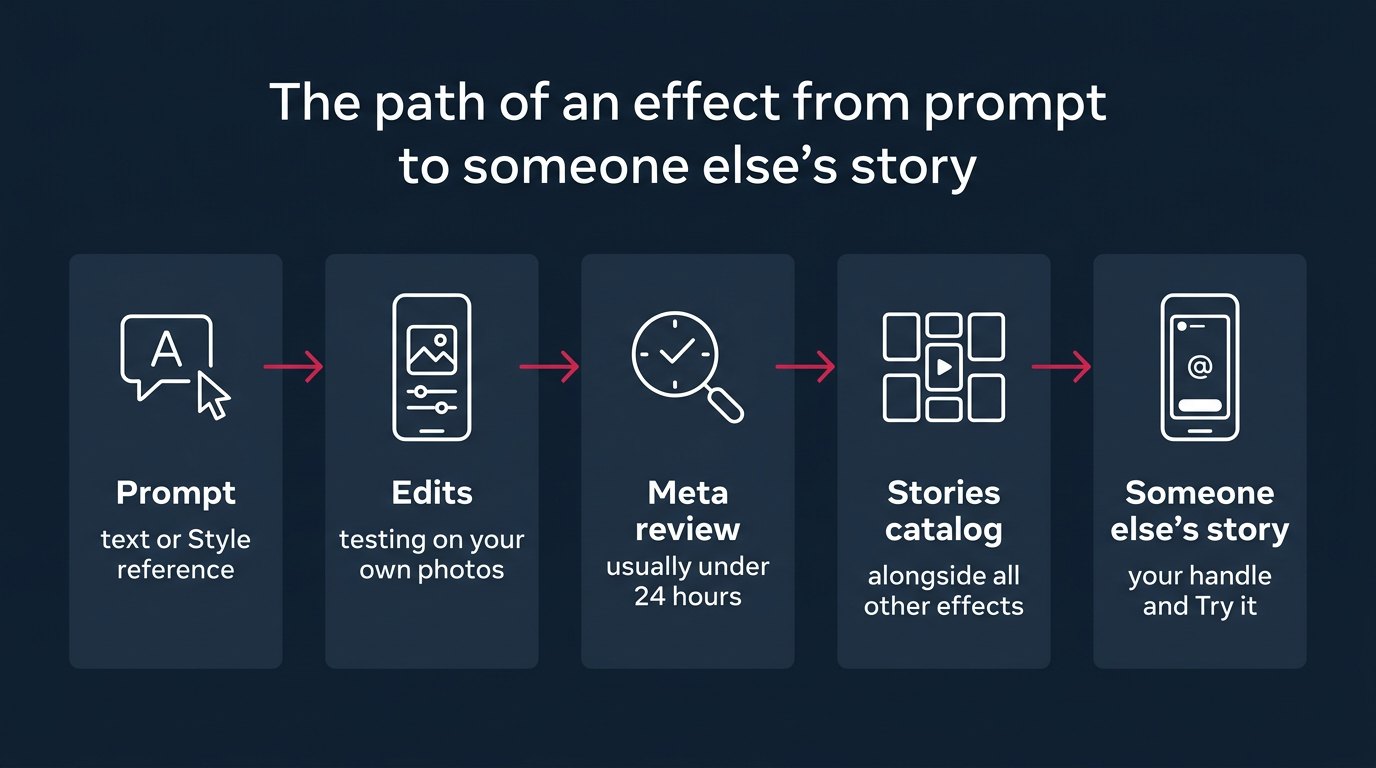
- Open edits.com/effectbuilder in a browser and sign in with your Instagram account. If you get an availability error instead of the home page, you can't go further; that's the country or age restriction.
- In the prompt field on the home page, describe the look you want in words. Instagram's examples point in 3 directions: warm grain of old film, pastel watercolor, comic book contrast.
- If words don't get you there, tap Style reference in the same field and upload a photo with the look you want. Meta AI, Meta's built-in assistant, will pull the color, light and texture from it.
- Test the result on your own photos. Not on a single lucky shot, but on a range: a face in daylight, a room in the evening, a street, an object in close-up.
- Ask for edits until you like it. Edits are written as text too: warmer, less grain, softer shadows.
- Publish the effect. After that it goes to review.
- Track its status in the Library tab inside Effect Builder.
- Once it's approved, find the effect under "My effects" and be the first to use it in your own Stories.
There's a curious detail about prompts. The Verge tested the tool: the AI rewrote a one-line prompt into several paragraphs on its own, but the effect came out almost the same as with the original line. The takeaway is simple: you don't need long prompt poems. A short, precise description plus a reference works just as well.
Effect review: where to check status and how long to wait
Before publishing, Meta checks every effect for safety. Review usually takes less than 24 hours, and the status is visible in the Library tab in Effect Builder.
What Meta hasn't said: what the review criteria are, what share of effects get rejected, what rights to the effect the creator keeps, and whether these effects get an AI label. That's 4 open questions. For a creator it means one thing: planning an effect launch for a specific date is risky. A day for review on average, but a rejection with no explanation is possible, and then a day turns into 2 or 3.
How an effect brings in followers: the handle, the "Try it" button and the counter
The growth mechanics work like this. The creator's handle appears on every story where the effect is used. A viewer sees a nice-looking image from someone they know, sees the label with the handle, can tap it and land on the creator's profile. Or tap "Try it" and shoot their own story with the same effect, and then their viewers see your handle.
The result is a chain where every link can spawn a new one. 1 person uses the effect, 300 of their viewers see the story, 3 of them try the effect themselves, and each of those has their own viewers. Not a single dollar spent on ads.
One nuance worth keeping in mind: any effect you create becomes available to all Instagram users. You can't restrict it to your followers or your customers. On the other hand, every use leads back to your profile, so the openness works in the creator's favor here.
And one more thing. The effect sits in "My effects", and you'll have to launch it in your own Stories yourself. Instagram's effects catalog is huge, and a new effect with zero uses simply drowns in it. The first stories with it have to be yours.
Which effects people will use, and which they won't
The main mistake I'm already seeing in discussions: brands want to make an effect with a logo on top of the frame. The logic makes sense: a logo in every stranger's story, free impressions. In practice, nobody wants to stick someone else's logo on their own face. People use an effect if it makes their photo look better. That's it.
Here's what I'd do: make an effect people want to apply to their own photo, not to the brand's photo. Not "our coffee shop" but "warm morning light, like in our coffee shop". The handle is already on the story; a logo in the frame adds nothing except a reason to scroll past the effect in the catalog. The argument is simple: the counter on the card shows the number of stories, and people shoot stories for themselves, not for a brand.
| Effect type | Will people apply it to their own photo | What the creator gets |
|---|---|---|
| Logo over the frame | Almost nobody | An empty counter |
| Signature color palette | Yes, if the palette looks good | Your handle on other people's stories |
| Seasonal or event style | Yes, for a short time | A spike in uses |
| Copy of a popular style | Yes, but there are plenty of them | Gets lost in the catalog |
| Style recognizable from the creator's feed | Yes, followers recognize it | Visits from people who know the style |
Prompt templates worth starting from. For a creator: describe your feed as if you were explaining to a colorist what you do to a shot. "Cool shadows, warm skin, light grain, muted green". For a brand: describe the feeling of the place, not the place. "Soft window light, beige tones, slightly blurred background". And upload through Style reference the 1 shot that shows the style best.
The effect's name decides whether people find it in the catalog. Name it after what people search for: "Warm film", "Pastel watercolor". Not after the brand. Only people who already know a brand search for it by name in the catalog, and they're already following you.
My position on quantity: at launch, 2-3 effects in the same style rather than 1. A single effect may miss the mood, while 3 versions of the same palette (daytime, evening, high contrast) give people a choice without diluting recognition. I wouldn't make more than 3 at once: your followers' attention at launch gets split, and none of the effects gets its first wave of uses.
How to measure what a Stories effect brings in
Instagram's announcement didn't show a separate "followers from effect" metric. There's the usage counter on the effect's card and your regular profile insights. You'll have to connect them by hand.
Here's the order:
- For the 7 days before launching the effect, record profile visits and new followers from your profile insights.
- On the day the effect is approved, record the usage counter on its card (most likely these will be your own stories).
- 7 days after launch, record profile visits, new followers and the usage counter again.
- Subtract your own stories from the counter. What's left are other people's stories, and those are the ones showing your handle to new people.
- Divide the difference in followers between the 2 weeks by the number of other people's stories.
I'll show the calculation with round hypothetical numbers so the math is visible. Say the week before the effect brought 120 followers. The week after brought 210. The difference is 90. The card shows 160 stories, 10 of them yours. That leaves 150 from other people. So 1 story by someone else with your effect brought in an average of 0.6 followers.
Next, compare that number with what a follower costs you through other channels. If Stories ads cost you a noticeable amount per follower, and the effect brings 0.6 followers per story for free, it makes sense to invest in new effects. If the difference between the weeks is within your normal fluctuation, the effect isn't bringing people in: they use it for the look and don't tap the handle.
You can estimate the viewers of a single story from market data. According to Socialinsider's benchmark for 2025-2026, for accounts with 1,000-5,000 followers a story reaches on average about 10% of followers, while for accounts with 100,000 to 1,000,000 followers it reaches less than 1%. Multiply that share by the typical follower count of the people who used your effect, and you get how many eyes saw your handle.
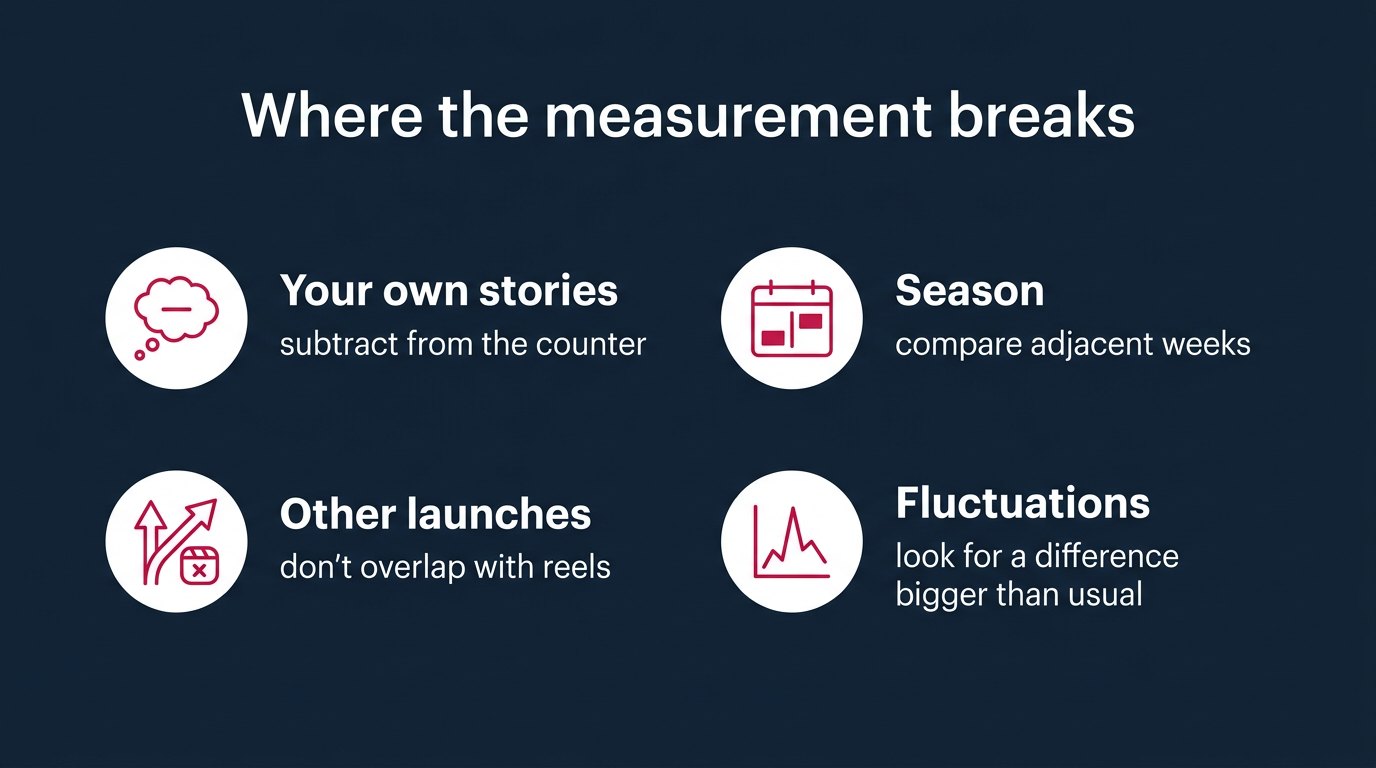
The trap is in keeping the comparison clean. If a successful reel went out the same week, all the growth will get credited to the effect. Launch the effect in a week without other major posts, or the number won't tell you anything.
What doesn't work and the pitfalls of Effect Builder
- The tool gives you no control over who uses the effect and how. It's available to every Instagram user. If someone picks it up whose content you'd rather not stand next to, your handle will still be on their story. You can't remove it; at least the announcement mentions no such setting.
- Rights. Meta hasn't said who owns an AI-made effect, or whether you can later move it or use it outside Instagram. After Meta Spark, where effects vanished along with the platform, I wouldn't build a brand's entire visual style on a single effect. The effect is a shop window; the style should live in the photos and videos themselves.
- The AI label. It's unknown whether these effects will be marked as AI-generated. For a photographer who sells shoots, an AI label next to their handle could work against them.
- Copying. Anyone can reproduce a style described in words. "Warm film with grain" will belong to dozens of creators within a month. Recognition doesn't come from the prompt but from the combination: the effect, a feed that looks the same, and your own stories using it.
- Prompt rewriting. The AI inflates a short line into several paragraphs on its own. Per The Verge's test, the result barely changes, but if the effect didn't come out the way you wanted, look for the cause in the reference and the edits, not in the prompt length.
What to do if you're not in the US
For everyone outside the US the tool is closed for now, and Meta hasn't given a timeline. Waiting passively makes no sense. Here's what I'd do: plan 2-3 effects in your style in advance, gather 5-10 shots for each that show the color and light you want, and write short prompts. When access opens, the first effects in a region will get more attention than the 10th one in the same palette.
Every couple of weeks, open edits.com/effectbuilder from your account and check whether the "Effects isn't available for this account" error is gone. Meta hasn't promised any notification when access opens.
I wouldn't advise getting around the restriction by changing the region on your account. Access conditions are tied to country and age, and Meta hasn't described the consequences for an account that fakes them. Risking your main profile for a Stories filter is foolish.
Brands in countries with their own rules on advertising through Instagram, Russia being one example, should get a lawyer's opinion before publishing an effect under a company name, since an effect that promotes a brand and links to its profile looks a lot like advertising.
Where Effect Builder goes from here
Instagram is building a full creator toolkit around Edits: editing, a Mac version, and now effects. That means Effect Builder is unlikely to stay a one-country experiment. There's no timeline, but the direction is clear: Instagram wants creators to make content inside its apps instead of leaving for third-party editors.
The effects catalog will fill up fast. Any adult user in the US can create an effect; it takes minutes plus a day for review. Once the tool opens up wider, there will be thousands of similar effects, and finding yours will get harder. The window when a new effect gets noticed simply because it's new will be short.
Questions about rights and the AI label will surface as soon as brands start investing in effects seriously. For now Meta is silent, which means it can change the terms at any moment. After January 2025 that isn't paranoia, it's experience.
I saw effects that creators had spent weeks on disappear after Spark shut down. Here the investment is smaller: a prompt, a reference, a day. If effects vanish again, the loss won't be fatal. That's the main difference from last time.
Questions
The tool is free. You don't pay to create an effect or to publish it in the Stories catalog. The limitation isn't money but access: US only and 18+ only.
That's the response for accounts outside the US or under 18. After the message, the site redirects to Edits. Meta hasn't said when the tool will open in other countries.
No. Effect Builder works only in a browser at edits.com/effectbuilder, which opens on edits.instagram.com. The tool isn't in the Edits app on phone or on Mac.
Usually under 24 hours. The review status is visible in the Library tab in Effect Builder. Meta hasn't published the review criteria or the rejection rate.
Under "My effects". Use it in your own Stories right away: that way the effect gets its first uses and the counter on its card stops showing zero.
No. Any published effect is available to all Instagram users. On the plus side, every story using it shows your handle and leads to your profile.
Tap Style reference in the prompt field on the home page and upload a photo with the look you want. Meta AI will pull the color, light and texture from it. Then test the result on your own photos and refine it with text.
What to do
- If you're in the US and over 18: make 2-3 effects in the same palette using Style reference, name them after the style rather than the brand, and be the first to use them in your own Stories.
- If you're not in the US: gather 5-10 shots and a short prompt for each future effect, and check access at edits.com/effectbuilder every 2 weeks.
- Record profile visits and new followers for the week before launching the effect, so that 7 days later you have something to compare the usage counter against.
- If your country restricts advertising through Instagram: get a lawyer's opinion before publishing any effect under a company name.
Writes about: SMM, paid boosts, ads, traffic, suppliers, the market from the inside, daily news