Google's core update lands on top of Black Friday


On November 10, 2026, Google began rolling out the November 2026 core update, a major search update and the 3rd of 2026. Google describes it as a broad recalibration of how search evaluates pages. The official estimate is up to 2 weeks, so Google rankings will keep jumping around until roughly November 24, possibly longer. Black Friday 2026 falls on November 27 and Cyber Monday on November 30. That means an honest "before" and "after" comparison will only be possible around December 1, when the sales are already over. Below I go through exactly what Google announced, who it affects, which week to save right now, how to read Search Console during the sales season, and how to protect your sales.
What Google announced on November 10, 2026, and at what time
The "November 2026 core update" entry appeared on the Google Search Status Dashboard at 10:06 Pacific Time on November 10. The Status Dashboard is the official page where Google logs search updates and outages. I converted the time for readers in other time zones: that's 18:06 UTC, 18:06 in London and 13:06 Eastern Time. What matters for the analysis is the date, November 10, because every comparison window is counted from it.
The entry is short. Google writes that the update "applies globally and to all languages", so it covers every country and every language, and that the rollout "may take up to 2 weeks to complete". The goal is described in one sentence: "This is a regular update designed to better surface relevant, satisfying content for searchers from all types of sites". Search Engine Journal and Search Engine Roundtable both noted that the wording is almost identical to the March announcement.
What the entry leaves out matters just as much. Google didn't name any ranking systems, content types, industries, countries, or the reason for the update. There is no separate post on the Search Central blog, Google's official blog for site owners. The documentation page on core updates was last updated on December 10, 2025, and Google gave no new guidance specific to the November update.
What came before November: 3 previous updates and how long they actually took
"Up to 2 weeks" is an estimate, not a promise. I checked the duration of past rollouts against the Status Dashboard history, and they missed the 14 day mark in both directions.
| Update | Start | End | Duration |
|---|---|---|---|
| December 2025 core update | December 2025 | December 2025 | 18 days |
| March 2026 core update | March 27, 2026 | April 8, 2026 | 12 days 4 hours |
| May 2026 core update | May 21, 2026 | June 2, 2026 | 11 days 21 hours |
| November 2026 core update | November 10, 2026 | ongoing | up to 2 weeks, per Google's estimate |
The May update started 173 days before the November one. In between there were 3 spam updates: in June, August, and September. A spam update is a separate category. It targets sites that violate search policies rather than recalibrating quality assessment as a whole. The September spam update ended on October 8, 33 days before the November rollout began. If your traffic graph twitched in September and early October, that's a different story, and you shouldn't mix it up with November.
One more detail: the results started moving before the announcement. Barry Schwartz of Search Engine Roundtable noted that shifts around November 9 had already prompted speculation about an upcoming update. So I would treat November 9 as a borderline day and keep that in mind when comparing.
Why the rollout gets in the way of the sales: a calendar from November 10 to December 1
Now the main point of this breakdown. Counting 14 days from November 10, the rollout ends no later than November 24. Google advises waiting at least a full week after an update finishes before analyzing your site. The full week after November 24 runs from November 25 to December 1, and it contains both Black Friday on November 27 and Cyber Monday on November 30.
- November 3 to 9baseline week before the start
- November 10rollout begins, 18:06 UTC
- November 24end if it takes 14 days
- November 27Black Friday
- November 30Cyber Monday
- December 1full week of post-update data
That's a double problem. During the rollout, rankings are unstable and it's too early to make decisions based on them. And the week right after the rollout coincides with peak demand, so clicks in that week will rise or fall for reasons that have nothing to do with the update. If the rollout stretches to 18 days, as it did in December 2025, it will end on November 28, and the full week after it won't close until December 5.
There's another layer. The most recent Search Console data can be preliminary and still being finalized, so it's better to leave the last 2 days out of any comparison. In practice, the week of November 25 to December 1 shouldn't be compared before December 3.
Who the update affects and who it doesn't
Formally, it affects everyone who gets traffic from Google: the update is global and covers all languages. But 3 groups will feel it most.
- Online stores. November brings in a large share of their annual revenue, and a ranking drop on product queries a week before Black Friday hits exactly that revenue.
- Affiliate sites: product reviews, roundups, and comparisons with links to stores. Their November income depends on queries like "best vacuum cleaner deal", and pages like these are often written to rank.
- Anyone preparing sale pages: dedicated Black Friday landing pages, deal roundups, promo codes. A new page published during the rollout gets its rankings in unstable results, and it will be hard to tell whether it was done well.
Who it affects less. If almost all of a site's traffic comes from Bing, social media, or direct visits, the November Google update will barely touch sales. Sites whose peak season isn't in November will get through the rollout more calmly: they'll have a clean comparison week in early December, with no seasonal noise.
Which pages are at risk. The agency Momentic believes content created to rank, rather than to answer a person, takes the hardest hit. In November that's a recognizable type of page: "top 10 deals" roundups with no testing of their own, sale pages built from template text, reviews rewritten from other people's reviews.
How hard it might shake: data from the March update
To understand the scale, it helps to look at last time. According to SE Ranking, a rank tracking service, 79.5% of top 3 URLs changed position after the March update. After the December 2025 update the figure was 66.8%. In March, about 24.1% of pages fell from the top 10 to beyond the top 100, compared with 14.7% in December.
How to read this. Almost 4 out of 5 pages in the top 3 moved somewhere, so the mere fact that a ranking moves during a rollout tells you nothing about your site. Falling from the top 10 to beyond the top 100, which happened to 24.1% of pages, is serious: that's not a 2 position wobble, it's lost visibility. Those are the cases worth investigating, not every shift.
Save your baseline week of November 3 to 9 right now
Google advises comparing the week after an update finishes with the week before the rollout started. For the November update, the week of November 3 to 9 works: it sits entirely before the November 10 start. November 9 is borderline because of the early fluctuations Barry Schwartz wrote about. If you want to play it safe, keep a backup option of November 2 to 8.
Why save it in advance if the data is already in Search Console anyway? In December, sales results, reports for your manager, and panic over the graphs will all land on you at once. An export made in advance answers 2 questions immediately: what to compare against and what rankings looked like before all of this.
How to save it in Search Console:
- Open the Performance report in the left menu, Search results section.
- Click the date filter, choose Custom, and set November 3 to 9, 2026.
- Turn on the Clicks, Impressions, CTR, and Average position metrics.
- Open the Queries, Pages, Countries, and Devices tabs one by one and export each through Export.
- Switch Search type from Web to Image, Video, and News and repeat the export: the update affects all of these types of search, and each is worth checking separately.
- Separately export the Discover report for the same dates if your site gets traffic from the Google Discover feed, the recommendations on a phone's home screen.
How I set up an export like this myself: one spreadsheet, one slice per tab (queries, pages, countries, devices, search types), with the period dates and the export date in the first row of each tab. A separate "Calendar" tab: start on November 10 at 18:06 UTC, an empty "rollout end" cell, and a formula that calculates the comparison window on its own as the end date plus 7 days plus 2 days for data finalization. When Google adds the completion date, I change one cell.
How to tell a ranking drop from seasonal demand
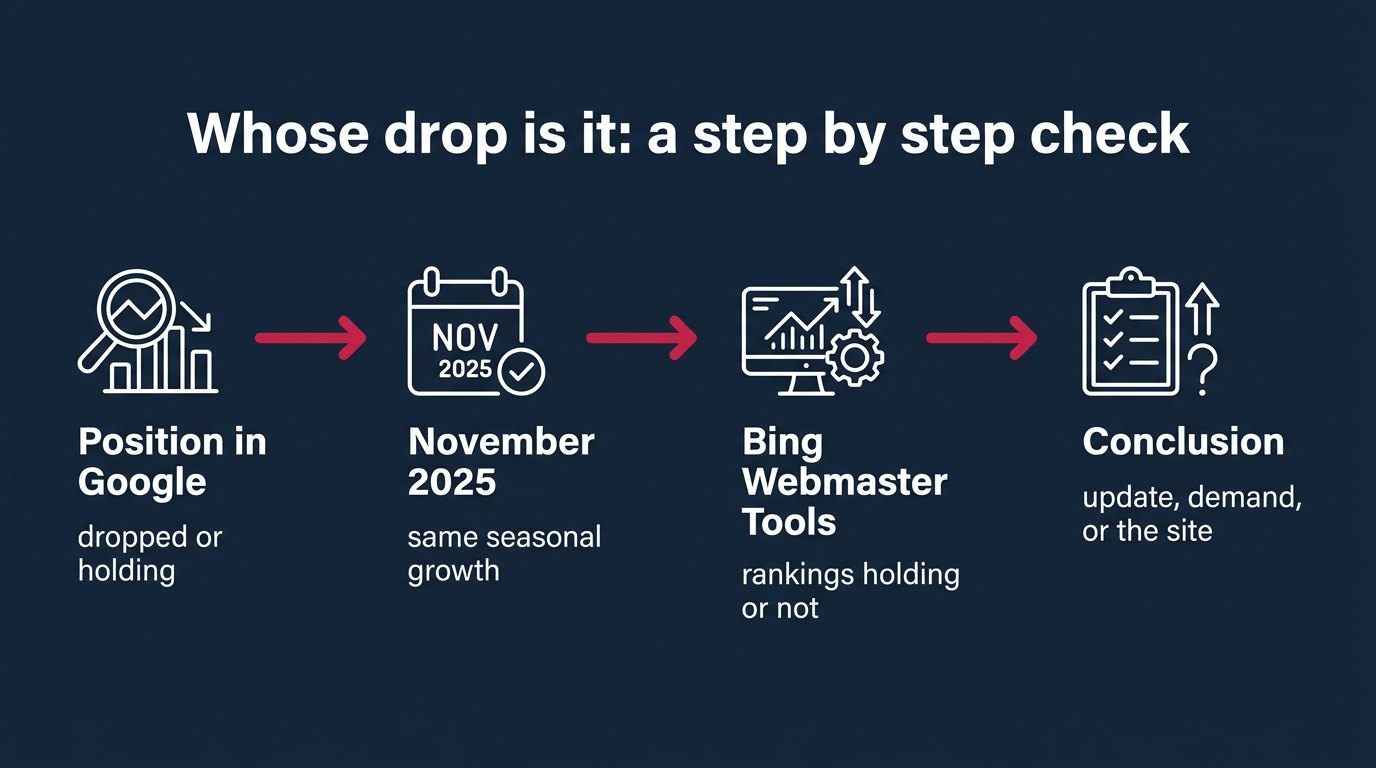
In November, demand rises ahead of the sales, and on a clicks graph that gets mixed up with the effect of the update. In their breakdowns of the November update, the agencies lab-leaders and Relevant Audience advise comparing the average position for your main queries rather than clicks. If the position holds but clicks go up or down, demand is the more likely cause. If the position drops, that's a question for the update.
I'll add 2 checks I didn't find in any reviews of this update.
Comparing with the same days in November 2025
The Performance report in Search Console stores 16 months of data, so November 2025 is in there. It's better to compare not the same calendar dates but the same distance from Black Friday. In 2025, Black Friday was November 28 and Cyber Monday was December 1. The week of November 3 to 9, 2026 corresponds to November 4 to 10, 2025, and the week of November 25 to December 1, 2026 corresponds to November 26 to December 2, 2025. In the date filter the path is the same: Compare, Custom, 2 periods from different years.
The logic is simple. There was no core update on those dates in 2025, so the growth in clicks from the baseline week to the sales week in 2025 shows your site's pure seasonality. If growth in 2026 is about the same, the update didn't touch you. If growth is noticeably lower and the position dropped, the difference is the effect of the update.
Bing Webmaster Tools as a control group
There's one more control that almost nobody uses: Bing. A Google update doesn't affect rankings in Bing, while pre-sale demand rises in both search engines. Open Bing Webmaster Tools, go to the Search Performance report, and compare the same dates for the same main queries.
- Rankings hold in Bing and clicks went up, while Google rankings fell: the cause is the Google update.
- Clicks fell in both search engines with stable rankings: the cause is demand or the site itself (prices, stock, delivery times), not the algorithm.
- Rankings fell in both: look for a technical cause on the site. The Google update is unlikely to be the main factor.
A worked example with numbers
I'll take a hypothetical store and run it through both checks. The numbers are made up for the calculation, but the logic is the same as yours will be.
The store's main query in the baseline week of November 3 to 9, 2026: average position 3.2, 1,000 clicks. In November 2025, the baseline week of November 4 to 10 had 900 clicks, and the sales week of November 26 to December 2 had 1,500. The site's seasonal growth: 1,500 / 900 = 1.67 times.
Scenario A. In the week of November 25 to December 1, 2026, the average position is 3.3 with 1,600 clicks. Growth is 1,600 / 1,000 = 1.6 times, almost the same as last year. The position moved by 0.1. The update didn't touch the store, and nothing needs to change.
Scenario B. The average position in the sales week is 6.8 with 1,100 clicks. Growth is only 1.1 times. If seasonality had worked as it did in 2025, there would have been about 1,000 x 1.67 = 1,670 clicks. The loss: 1,670 minus 1,100 = 570 clicks, or 34% of what was expected. Meanwhile, in Bing Webmaster Tools the position for the same query didn't change. This is the effect of the update, and that page needs work.
Notice this: if the store in Scenario B looked only at clicks, it would see growth from 1,000 to 1,100 and decide everything was fine. Click growth during the sales season masks a ranking drop. That's why you have to compare position and last year, not raw clicks.
A small drop or a big one: when to leave things alone
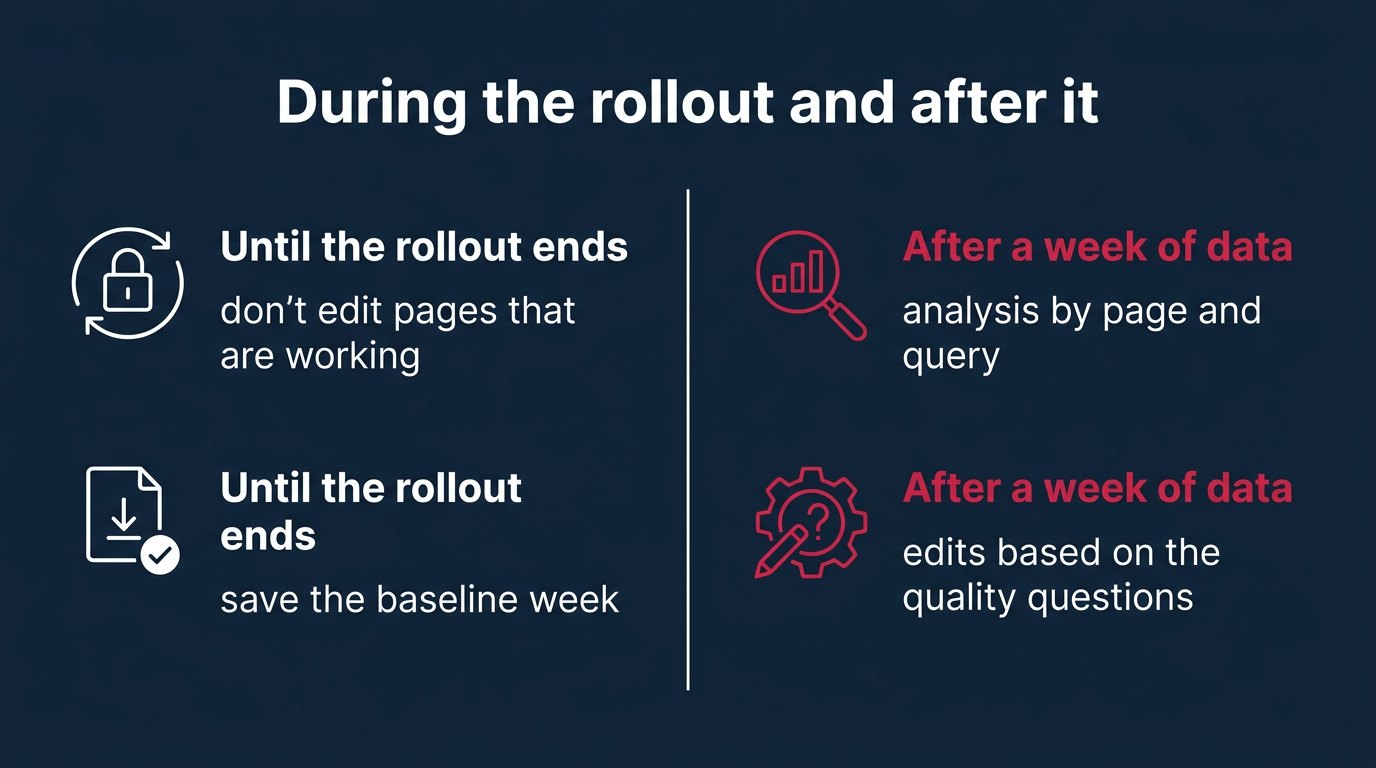
Google says it plainly: with a small drop, for example from position 2 to 4, there's no need for drastic action. Content that's already performing well is best left untouched. During a rollout, rankings can go down and come back within a few days, and editing a page at that moment only adds noise: you won't know what worked, the update or your changes.
A big drop looks different: a page fell out of the top 10 far down and stays there after the rollout ends, or dozens of pages of the same type fell at once, for example all your product roundups. Those cases are worth investigating, but after the rollout ends and a full week of data is in, not on November 15.
My own position here is firm. During the rollout I wouldn't rewrite a single page that already brings in traffic, even if it slipped 5 positions. The argument comes from the SE Ranking numbers: in March, 79.5% of top 3 URLs changed position, so movement in these days is normal, not a signal. Editing during the rollout breaks the only thing you have for analysis: a clean comparison of the same page before and after.
A core update is not a penalty: where to check that it's not a violation
A core update is a broad change in how quality is assessed. It doesn't target specific sites or pages. Google states separately that losing rankings after such an update doesn't mean something is wrong with the page: the system simply started considering other pages more useful. Spam updates and penalties for violations are a different category.
To rule out penalties, open the Security & Manual Actions section in Search Console, Manual Actions item. A manual action is a penalty a Google employee applies for violating search policies. If it says no issues were detected, the traffic drop doesn't prove any violation. In that case you need to look at quality and competitors, not file reconsideration requests.
What to do if a page did drop
Step 1 after the rollout ends: find what exactly dropped. In the Performance report, compare the week after the end with the baseline week and go through the tabs:
- Pages: which pages lost the most impressions. If one type of page dropped, that's a hint: the update evaluated that format differently.
- Queries: on which queries. A page often loses only some of its queries, not all, and that shows which question it answers worse than competitors.
- Countries: if the site serves several countries, the drop may be in only one.
- Devices: a drop only on mobile and a drop everywhere call for different checks.
- Search type: Web, Image, Video, and News separately, plus the Discover report.
Step 2: honestly go through the content quality questions in Google's documentation. They include, for example: does the page provide original information or its own analysis, does it cover the topic fully, was it written for people or to rank in search. Open your page that dropped and the page that took its place, and answer these questions about both. It's tedious, but more useful than any "optimization for the update".
Here, human behavior explains the numbers better than algorithms do. Someone searching for "best robot vacuum for Black Friday" doesn't want a list of 10 models. They want a decision: which one to buy and why it's a good deal at the sale price. A roundup assembled for the query doesn't answer that, and the person goes back to the results to keep looking. Core updates exist precisely so that pages like that get shown less often.
Step 3: adjust your expectations on timing. According to Google's documentation, some changes take effect within a few days, but the systems may need several months to confirm a site's quality. If there's no effect after several months, you may have to wait for the next core update. Google also regularly releases smaller core updates without announcement, and those can lift rankings too.
AI Overviews, AI Mode, images, and video: what to check separately
Core updates affect not only the blue links but also Google Discover and other search features, including featured snippets, the ready-made answer boxes above the results. Average position alone isn't enough for the full picture.
I'll add a check I haven't seen in any reviews: visibility in AI Overviews and AI Mode. AI Overviews is an AI-generated answer above Google's results with links to sites. AI Mode is a separate search mode in a conversational format. Search Console reports don't break these impressions out into a separate tab, so I check by hand. Before the rollout ends, open 10 to 20 of your site's main queries, take screenshots, and record in a spreadsheet: is there an AI Overview, is your site cited, what does AI Mode answer. A week after the rollout ends, repeat. If you've disappeared from the AI answer while your position in regular results holds, that's a different problem and needs to be investigated separately.
The agency Momentic believes this is the first core update since Search Console added a report on multimodal search, meaning search by images, video, and camera, and that it may therefore have a bigger impact on how images and video are shown. Google hasn't said this. I treat that forecast as a hypothesis that's easy to check yourself: if you get a lot of traffic from Google Images or video, compare the Image and Video search types separately from Web. I wouldn't base decisions on this forecast before the data comes in.
How to protect Black Friday sales with ads
Rankings are unpredictable until November 24, maybe longer, and you need sales on November 27 and 30 regardless. The logical safety net: Google Ads search campaigns for the main product queries where you risk losing organic traffic.
Here's my view on ads. I wouldn't launch ads "on everything" out of fear: it's expensive and pointless for queries where the site is already in the top 3 and the position hasn't moved. I'd launch them selectively: on queries where the position has already slipped during the rollout and on the categories that bring in most of the Black Friday revenue. Always with a cap on cost per click: in November, competition for clicks rises, and without a bid ceiling the sales budget is gone in 1 to 2 days.
How to calculate the safety net budget. Take the click shortfall, 570 clicks in the example above, and multiply it by the average cost per click in your niche. A market benchmark: the agency SmartSites analyzed 113 ecommerce accounts in Google Ads. According to its data, over the 5 days from Thanksgiving to Cyber Monday 2025, the average cost per click was $0.857, and on Cyber Monday itself it was $1.185, 33% above the annual average. So covering the shortfall from the example costs roughly 570 x $0.857 = $489 at average sale prices, and up to 570 x $1.185 = $675 at Cyber Monday prices.
Steps in Google Ads:
- Create a search campaign only for your main product queries, not the whole catalog.
- In the campaign settings, under Bidding, set a maximum cost per click limit.
- Set the dates: November 20 to 30, so the ads run at the peak and don't spend budget after it.
- After November 30, turn off the campaign and compare which sales came from ads and which from organic search.
The same logic applies to Microsoft Advertising, but remember that the November Google update doesn't touch Bing rankings. Use ads to back up the search engine where organic traffic actually dropped.
The pitfalls people fall into most often
- Comparing clicks instead of positions. During the sales season, clicks grow for almost everyone, and a ranking drop hides behind that growth, as in Scenario B from the example.
- Comparing before the rollout ends. The 2 week timeframe is an estimate: the December 2025 update ran for 18 days. Wait for the completion line in the same entry on the Google Search Status Dashboard.
- Including the last 2 days in the comparison. Search Console data for them can be preliminary and change later.
- Mixing it up with a spam update. The September spam update ended on October 8, and if the drop started in September, the November update has nothing to do with it.
- Using a new sale page as an indicator. A page published during the rollout says nothing about how the algorithm treated the site: it has no history before the update.
- Filing a reconsideration request with no manual action. If Manual Actions is empty, there's nothing to reconsider.
What comes next
The pace of updates in 2026 is intense: March, May, November, plus 3 spam updates in between. 173 days passed between the May and November updates, and about 3 months between the December 2025 and March updates. If a site dropped hard and doesn't recover between updates, at this pace the next chance will come in roughly 3 to 6 months, that is, in spring 2027.
Judging by March, the scale is growing. The share of top 3 URLs that changed position rose from 66.8% in December 2025 to 79.5% in March 2026, and the share of pages that fell from the top 10 to beyond the top 100 rose from 14.7% to 24.1%. If the November update continues this trend, there will be more severe drops, and you'll have to analyze them in December alongside the sales results.
A separate line for the future: visibility in AI answers. Google hasn't said anything about a connection between core updates and AI Overviews, but a spreadsheet of screenshots collected in November will also be useful for the next update: you'll have a reference point that most sites don't have.
Questions
Google estimates the rollout at up to 2 weeks from the November 10, 2026 start, so around November 24. Previous updates went past that estimate in both directions: March took 12 days 4 hours, May took 11 days 21 hours, and December 2025 took 18 days. Google will add the exact date to the entry on the Search Status Dashboard.
The week before the rollout started: for this update, November 3 to 9, 2026 works. Compare it with the full week after the rollout ends. If the rollout ends on November 24, that's November 25 to December 1, and with 2 days for data finalization, the comparison makes sense no earlier than December 3.
Look at the average position for your main queries, not clicks. If the position holds but clicks are down, demand is the cause. Also compare growth with the same days before Black Friday in 2025, and check your rankings in Bing Webmaster Tools: a Google update doesn't affect Bing.
No. Google advises against drastic action for a small drop, for example from position 2 to 4, and recommends leaving well-performing content alone entirely. Editing during the rollout mixes the effect of the update with the effect of your changes, and you won't be able to untangle them later.
No. A core update doesn't target specific sites, and losing rankings doesn't mean you violated any policies. To rule out penalties, check the Security & Manual Actions section in Search Console, Manual Actions item. If it's empty, work on page quality, not on violations.
According to Google's documentation, some changes take effect within a few days, but the systems may need several months. If there's still no effect after several months, you may have to wait for the next core update. Smaller unannounced updates can also bring rankings back.
Yes, core updates affect Google Discover, featured snippets, and other search features. Check Web, Image, Video, and News in Search Console separately and look at the Discover report on its own. The view that the November update will hit images and video harder comes from the agency Momentic, and Google hasn't confirmed it.
What to do
- Export the week of November 3 to 9, 2026 from Search Console by query, page, country, device, and search type, plus Discover.
- Export the same slices for November 4 to 10 and November 26 to December 2, 2025: that's your seasonality without an update.
- Take screenshots of the results, AI Overviews, and AI Mode for 10 to 20 main queries and log them in a spreadsheet with the date.
- Launch a Google Ads search campaign with a cost per click cap for November 20 to 30 on queries where rankings have already slipped.
- Put a reminder in your calendar to check the Google Search Status Dashboard and run the comparison 9 days after the rollout completion line appears.
If you'd like, I'll take a look at your case. Write to support.
Writes about: SEO, Google and Yandex search, indexing, links, content for search, AI answers

 Aleksandr