Where your TikTok views actually came from

The counter under a video shows one number. It doesn't answer the main question: did TikTok show the video to new people in the recommendation feed, or did the views come from somewhere else? The "Traffic sources" screen in TikTok Studio answers that. It splits a video's views into 7-8 rows: For You, Following, profile, search, sound, hashtags, direct messages and "Other". Below I go through each row, the 24-48 hour update delay, the difference between a video the feed rejected and a video that was never allowed into the feed, and a check you can repeat after every boost.
Why the total view count tells you nothing about recommendations
A view is a view. The counter doesn't care who pressed play: someone TikTok served the video to in the For You feed, one of your followers, someone who followed a link from Telegram, or an account that looks like a bot. It all adds up to one number.
Waiting for organic growth after buying views? Then the counter is doubly useless. Purchased views inflate it, and you can no longer see whether the platform did anything on its own. 8,000 under a video can mean "the algorithm pushed it to thousands of strangers" or "the algorithm did nothing, everything came through a link".
The only way to tell them apart is the breakdown. For You on TikTok is the main recommendation feed, the one people scroll without following anyone. If the platform is testing a video, the views come from there. No For You row, no test. Everything else is secondary.
Where to find the "Traffic sources" screen in TikTok Studio
TikTok Studio is the creator section inside the TikTok app and on the TikTok website, where account and per-video stats live. A similar section used to be called "Creator tools", so older guides use that name too. Business account owners see the same analytics in Business Suite, TikTok's dashboard for companies.
The path in the app:
- Open your profile.
- Tap the three-line menu icon in the top right corner.
- Choose "TikTok Studio".
- Open "Analytics".
- Tap "View all" to open the full stats.
- Tap the video you want. Its page shows retention, traffic sources and viewer data.
On the website the path is shorter: open TikTok Studio in a browser and go to the "Analytics" tab in the left menu. For source breakdowns the web version is more convenient. Bigger screen, easier to compare several videos in a row and export data.
Available periods: last 7 days, 28 days, 60 days, 365 days, or a custom report with any dates. In the web version a custom period can start no earlier than July 17, 2022, and one export covers up to 365 days of data. Keeping a spreadsheet of videos over several years? Export it one year at a time.
One detail people skip. Analytics has to be turned on if it isn't already. Without it you also won't see TikTok's decision that a video is ineligible for the For You feed, and that's the key diagnosis in this whole article. If the account is personal and has no analytics, first switch to a creator or business account in settings, otherwise there's nothing to look at.
What each TikTok traffic source means
The rows on the sources screen mean different things. Half the mistakes in reading analytics come from people confusing "profile" with "recommendations" and treating "Other" as junk.
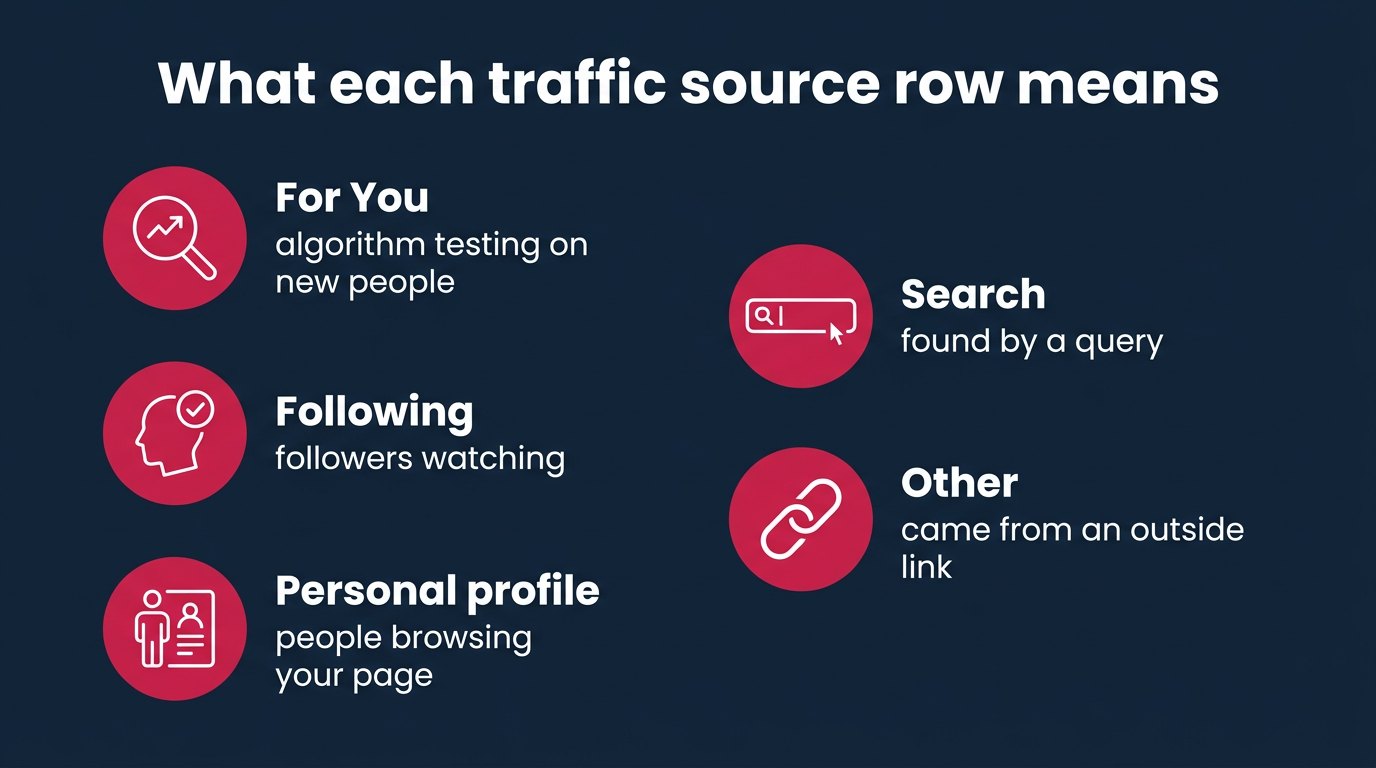
For You: views from the recommendation feed
For You is the feed TikTok builds for each person on its own, based on their interests. Views in this row mean one thing: the platform decided to show the video to someone who most likely doesn't follow you and wasn't searching for you. A large For You share means the algorithm is distributing the video. It's the only row that directly answers "was the video tested".
Following: views from followers
Following is the subscriptions feed, where a person sees only videos from accounts they follow. Views here come from your base. If your followers are real and watching, the row grows with every video. If the base was bought and most of it hasn't opened the app in ages, the row stays small no matter how many followers the profile counter shows.
Personal profile: views from your page
Personal profile means views from people who were already on your page and tapped a video in the grid. This row is often misread. A spike here usually means your followers went to your profile after a new post and scrolled through videos. The algorithm didn't show you to new people.
That said, the row isn't useless. Someone who came from For You, watched to the end, opened your profile and played 3 more videos leaves a trace exactly here. Profile growing together with For You is a good sign: strangers got interested in the creator and may follow. Profile growing without For You more often means your own people are watching.
Search: views from search
Search means views from people who typed a query into TikTok search, found the video in the results and tapped it. The video page has a separate "Search queries" block listing the queries that led to it. If the block is empty, the video most likely didn't show up in search results for any query.
Search and the caption are directly connected. TikTok understands what a video is about, partly from the words in the description and the on-screen text. A video captioned "like this" with 3 emojis is almost impossible to find by query. A video captioned "how to get a coffee stain out of a white shirt" can pull search traffic for months. For videos that have dropped out of recommendations, search is often the only live row. More on why below.
Sound: views from the sound page
Sound means views from people who opened the page of a track or original sound and scrolled the videos under it. The row grows when the sound is popular and people look for videos using it. If the sound is yours and others start making videos with it, this row shows your video became the starting point.
Hashtag: views from hashtag pages
A hashtag page collects every video with that tag. Some breakdowns show it as a separate row, some don't: the set of rows differs between interface versions. It's usually a small share, and when it exists, it rests on niche tags people actually open.
Direct Messages: views from DMs
Direct Messages means views when a recipient watches a video someone sent them in a TikTok chat. The row shows the video grabs people enough to share it. Sending takes effort: pick a person, tap "send". So even a small share here says more about the video than likes do.
Other: everything else
Other is 3 things at once: views from external shares (someone clicked a TikTok link on Twitter, WhatsApp or a website), views from features without their own row, and views from legacy interface elements. For analysis after a boost, this is the most important row after For You. I'll come back to it separately.
| Row | Who's watching | What growth means |
|---|---|---|
| For You | Strangers in the recommendation feed | The algorithm is testing or distributing the video |
| Following | Followers in the subscriptions feed | The base is real and watching |
| Personal profile | People already on your page | Followers browsing your profile, or new viewers got interested |
| Search | People who searched a query | The video is findable by words |
| Sound | People who opened the sound page | The sound is popular or trending |
| Hashtag | People who opened the tag page | The tag is niche and active |
| Direct Messages | Recipients of a shared video | The video is being sent around |
| Other | Outside clicks and the rest | The link is being opened on other platforms |
Why the numbers stall and don't match the counter
The classic case. A video goes up, 6 hours later it has 3,000 views, analytics shows 400, and traffic sources are completely empty. The person panics and starts buying more. Don't.
According to third-party breakdowns of TikTok analytics, the traffic source split updates every 24-48 hours. There's no fixed time: TikTok processes analytics in batches, not in real time. Numbers might update in the morning and not in the evening, then jump 2 days ahead the next day.
The gap between the counter under the video and the analytics figure has 2 causes:
- Batch processing delay. The counter is live, analytics catches up late.
- Filtering. Some views, for example ones that look bot-generated, are cut before they reach analytics. They may flash on the counter, but they won't be in the report.
The second cause directly concerns people who buy views. The analytics figure may come out lower than what you paid for, and that's not necessarily the seller underdelivering. It's TikTok's filter deciding some of the views weren't human. Hence the rule: check an order against the counter under the video, and judge the algorithm's reaction only by analytics.
3 more limits people trip over:
- The "Followers" tab in analytics only shows data once the account has at least 100 followers. On a new account it's empty, and that's not a bug.
- Post view history, which shows exactly who watched your videos, has to be turned on separately and only works for accounts with up to 5,000 followers.
- Viewer gender, age and location are calculated by a TikTok prediction model, not taken from verified user data. It's an estimate, not a census. If you base a product decision on "62% of my audience is women aged 25-34", keep in mind that's the algorithm's guess.
What the traffic breakdown looks like after buying views and followers
Almost nobody writes about this. Probably because it's awkward. I will.
Purchased views are almost always delivered through a link to the video. The seller takes the URL, hands it to their accounts or runs it through their system, and the video gets opened directly. The For You feed didn't bring those people to the video. By TikTok's definition, a view from an outside link lands in "Other", if it reaches analytics at all and isn't cut by the filter as bot-like. A purchased view does not land in For You. There's no mechanism for it: For You means the feed showed the video, and the seller doesn't control the feed.
After a boost, the breakdown shifts like this:
- The "Other" row jumps, if the purchased views got past the filter.
- The For You share in percent drops, even if the count didn't change. The denominator grew, the percentages slid.
- The total in analytics may be noticeably lower than what you bought: filtered views didn't make it into the report.
Followers are a different picture. Purchased followers raise the number on the profile, but the Following feed only shows videos to people who actually open the app. If the base is inactive, the Following row stays small. I've seen accounts with more followers than views on a video, and Following in the breakdown close to zero. That's exactly what a bought base looks like.
Now the honest part. TikTok's Integrity and Authenticity rules (the section of the community guidelines on manipulation) prohibit accounts that mislead or manipulate the platform, and prohibit trading in services that artificially inflate engagement. mrpopular sells, among other things, TikTok views and followers. Pretending that rule doesn't exist would be silly. A boost gives you social proof on the counter. It doesn't draw the For You row, and any conversation about "I bought views, where's the organic reach" has to start there.
My position is simple. A boost as a prop for a live video makes sense: someone who arrives from For You and sees 40 views scrolls on faster than someone who sees 4,000. A boost instead of a video makes no sense. If there's no For You in the breakdown before the boost, there won't be any after: the problem was the video or its eligibility for the feed, not the number on the counter. I look at the breakdown first, then decide whether to buy anything. Not the other way around.
3 similar states: video rejected, video ineligible, account excluded
From the outside all 3 look the same: the video isn't growing. Inside they're different diagnoses with different fixes. Mix them up and you'll spend a month reshooting a video that did nothing wrong, or appealing a video that simply didn't land.
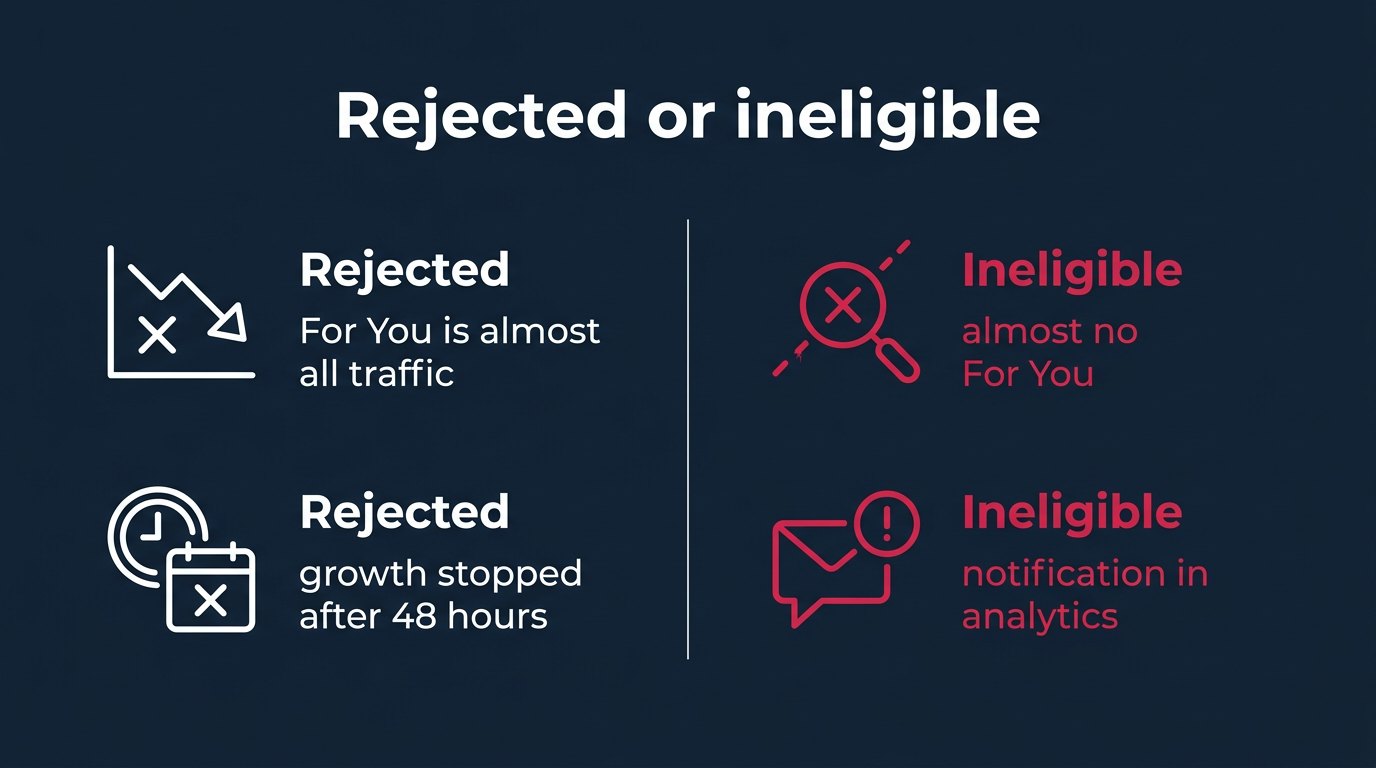
The video was tested and rejected
Almost all traffic is from For You, but the count is small, and after 48 hours it stopped growing. TikTok showed the video to a small group in the feed, watched the reaction and stopped distributing. That's the algorithm working normally. The rule from TikTok's help center: low views can be the result of weak audience response, not ineligibility for the feed.
What to check alongside: retention on the video page and average watch time. If viewers leave in the first 2-3 seconds, the feed got a clear "not interesting" signal. The fix is the video: a different opening, a different first frame, shorter. An appeal has nothing to do with it.
The video is ineligible for the For You feed
For You is nearly absent from the breakdown, and traffic comes from profile, Following, search, "Other". The video wasn't tested at all. That points to something systemic, usually ineligibility for the For You feed. TikTok can close off recommendations for a video without removing it: the video stays on the profile, people find it through search and followers see it in their Following feed, but it doesn't reach anyone else's recommendation feed.
The ineligibility decision is visible in analytics if analytics is on: you get a notification for that video. Common reasons under TikTok's rules:
- Unoriginal or reused content with nothing new added: reuploading someone else's video, clips with no work of your own.
- Content that breaks the For You eligibility standards, even if it doesn't break the rules badly enough to be removed.
A separate note on ads. Under the community guidelines published August 25, 2026 and in force from September 24, 2026, replacing the version from September 13, 2025, undisclosed commercial content is no longer automatically excluded from For You. Previously an ad video without a disclosure label could simply drop out of the feed. Under the new version TikTok may reduce its reach or turn on the ad disclosure setting itself. So an unlabeled sponsorship now more often looks like "reach dropped" than "video ineligible".
The whole account is temporarily excluded from recommendations
Since 2024 TikTok has had a rule: if a creator repeatedly posts videos that break the standards, the whole account can temporarily lose eligibility for For You recommendations. Such accounts are also harder to find in search.
The sign is different from a single ineligible video. Not one video without For You, but every one in a row, including new and harmless ones. And it's not only the For You row that sank, Search did too: since the account is harder to find, the search row melts as well. Reshooting videos is pointless here until the exclusion period ends and as long as the account keeps breaking the rules.
| State | For You in the breakdown | Other rows | What to do |
|---|---|---|---|
| Tested and rejected | Almost everything, but a small count, growth stopped | Small | Check retention, change the video |
| Video ineligible | Almost none | Profile, Following, search, Other | Find the notification, appeal or remove the cause |
| Account temporarily excluded | Almost none on every recent video | Search also drops | Stop the violations, wait out the period |
How to check whether you reached recommendations: an hour-by-hour check after posting or boosting
The check below repeats after every video and every boost. It rests on one rule: the breakdown updates every 24-48 hours, so anything you look at earlier isn't information. It's nerves.
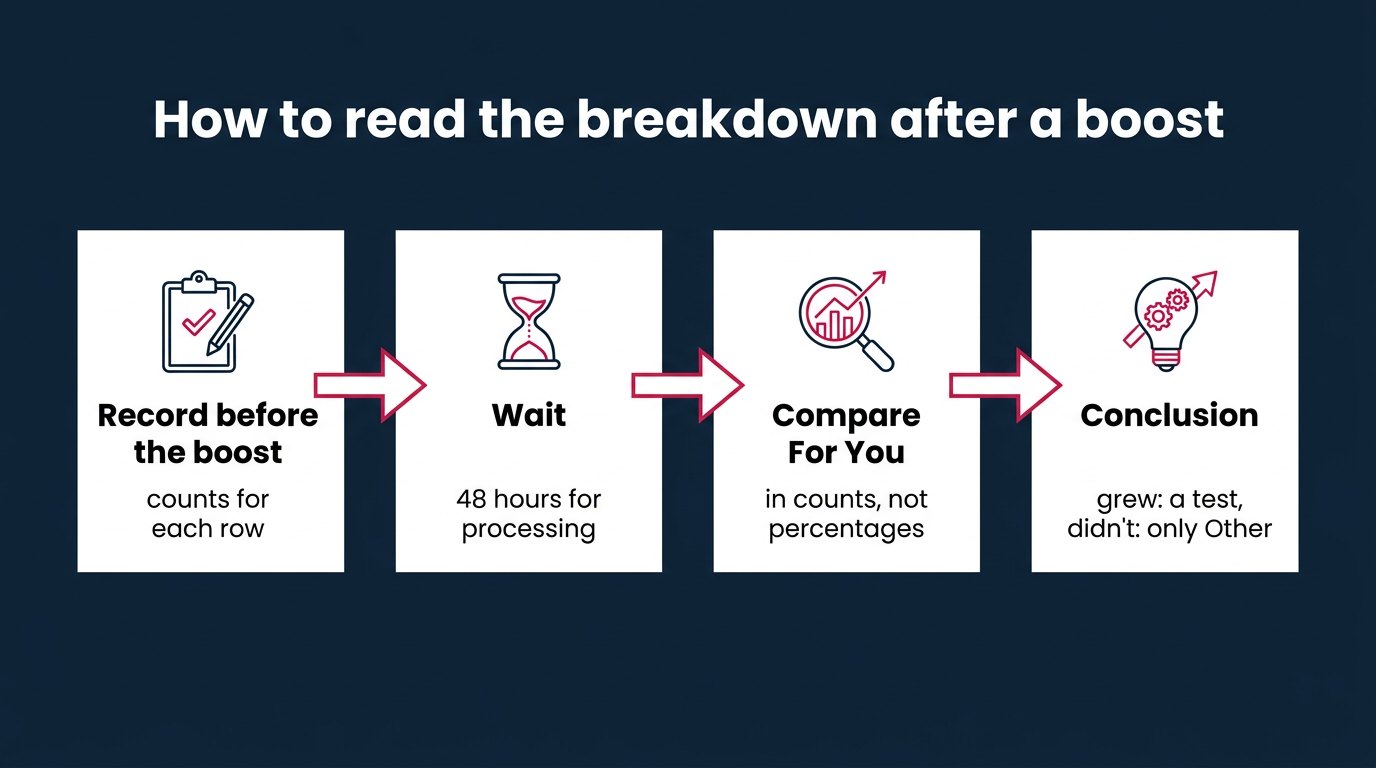
- Before the boost, at hour 0. If the video has been up for more than 48 hours, open TikTok Studio, the "Analytics" tab, the video, the traffic sources block. Write down counts for each row, not percentages: convert percent of the total into counts. Separately note the counter under the video.
- New video without a boost, first 48 hours. Touch nothing, don't delete, don't reupload. The breakdown is incomplete in the first day, too early to decide anything.
- 48 hours after posting. The first real data point. Check whether For You exists at all. If it's there and growing, the video is being tested. If it's almost absent, look for an ineligibility notification on the video's analytics page.
- 48 hours after the boost. Compare counts against hour 0. "Other" growing while For You stays flat means the purchased views arrived and the algorithm didn't react. For You growing in count means the video went into recommendations.
- Counter versus analytics. Counter minus the analytics total gives a rough estimate of views that were filtered or not yet processed. If the gap doesn't shrink after 48 hours, part of the views were most likely cut by the filter.
- After 7 days. Use the "last 7 days" period in TikTok Studio. If For You has been flat since day 3, the test is over. Check search queries: if the "Search queries" block is empty, the video isn't searchable, and it's worth rewriting the caption for the next one.
- Account check. Add up the For You row across your last 3-5 videos. If it's near zero everywhere and Search has dropped too, it's not a bad video but a likely account exclusion.
The main rule of comparison: counts, not percentages. The For You share almost always drops after a boost because the denominator grew. Someone sees "For You fell from 80% to 20%" and decides the boost killed recommendations. In counts, nothing may have changed, or it may even have grown.
- Hour 0record the breakdown in counts
- Hour 24first data, make no decisions
- Hour 48is there For You, is there a notification
- Day 7has growth stopped, are search queries empty
Worked example: a video after buying 5,000 views
The numbers are hypothetical, to show the math. Say a video has been up for 3 days. Analytics shows 1,200 views. Breakdown: For You 85%, profile 8%, Following 5%, Other 2%.
Convert to counts:
- For You: 1,200 x 0.85 = 1,020
- Profile: 1,200 x 0.08 = 96
- Following: 1,200 x 0.05 = 60
- Other: 1,200 x 0.02 = 24
It's already clear the video was tested, almost all traffic came from the feed. But 1,020 from For You plus stalled growth means it didn't pass the test. That's the "tested and rejected" state.
Then the person buys 5,000 views. A couple of hours later the counter under the video shows 6,200. After 48 hours analytics shows 5,400. The difference, 6,200 minus 5,400 = 800 views, didn't reach the report: some were probably filtered as bot-like, some are still processing.
New breakdown, scenario 1: For You 1,050, profile 110, Following 60, Other 4,180. Percentages: For You 1,050 / 5,400 = 19%, Other 4,180 / 5,400 = 77%.
Panic by percentages: "For You fell from 85% to 19%". By counts: For You grew by 30 views, from 1,020 to 1,050. So it barely changed. The purchased views settled in "Other", and the algorithm didn't notice them. The video was rejected and stayed rejected.
Scenario 2, if the video had been picked up: For You 3,400, profile 300, Following 70, Other 4,100. Then For You grew from 1,020 to 3,400, 3.3 times. That's a retest: the feed brought the video back to people. And profile grew from 96 to 300, meaning strangers started visiting the page.
The difference between the scenarios is visible only in the For You count. The counter is roughly the same in both.
How to appeal For You ineligibility
If step 3 of the check turned up an ineligibility notification, you can contest it. The path in the app:
- Open the video.
- Tap "More insights" or "More options", then "Analytics".
- Tap the notification saying the video is ineligible for the feed.
- Tap "Appeal" at the top of the screen.
If analytics is off, you won't see the notification at all, so turn it on in advance.
My position: I'd only appeal where I honestly don't understand what was violated. A normal video, my own footage, no clips lifted from others. If the video is built from someone else's material with no contribution of your own, the appeal will almost certainly hit the unoriginal content rule, and the time is better spent on a new video. And if the whole account is excluded, a one-off appeal for a single video won't solve it: you need to stop whatever keeps breaking the standards, otherwise the period will keep getting extended.
What doesn't work and why
The breakdown updates every 24-48 hours. After 6 hours you're seeing processing delay, not the algorithm's reaction. Reuploading the same video also risks falling under the reused content rule.
Purchased views arrive through a link and at best land in "Other". They don't move the For You row directly. If the video had no For You before the boost, the boost won't help you find the cause, it'll hide it behind a big number.
A Personal profile spike after posting usually means followers were scrolling your page. If For You is empty at the same time, there were no new people.
The subscriptions feed only shows videos to people who open the app. An inactive base gives you a number on the profile, not views in Following.
TikTok demographics are a model's prediction, not verified data. A guide, not the truth.
If the "Search queries" block has been empty for months, the video isn't searchable. A description like "watch till the end" tells search nothing. A caption about what the video actually covers, in the words people search with, works better.
If the check shows the video is alive, with For You present and growing, then propping up the numbers can speed up what's already happening. In that scenario I add TikTok views after I've seen For You grow in count at the 48-hour mark, not before. If there's no For You, I don't put money into a boost. First I figure out whether the video was rejected or ineligible.
Questions
TikTok processes analytics in batches, and the source breakdown updates every 24-48 hours with no fixed time. In the first day after posting it's incomplete or empty. Don't draw conclusions before 48 hours.
2 reasons: processing delay and filtering. The counter under the video is live, analytics catches up. Some bot-like views are cut before reaching the report and never appear in analytics.
Views from outside links (Twitter, WhatsApp, websites), views from features without their own row, and views from legacy interface elements. After buying views this row usually grows, because purchased views arrive through a link.
No. For You means the recommendation feed showed the video, and purchased views come through a direct link. They may land in "Other" or get filtered, but they won't be in the For You row.
The For You row is nearly absent from the breakdown, and traffic comes from profile, Following and search. With analytics on, you get an ineligibility notification for the video. You can appeal it through the video's "Analytics", with the "Appeal" button.
The "Followers" tab only shows data after 100 followers. Until then it's empty, and that's a platform limit, not a glitch.
The For You row is empty not on one video but on all your recent ones in a row, and search drops at the same time. Since 2024 TikTok can temporarily exclude an account from recommendations if the creator repeatedly breaks the standards.
What to do
- Turn on analytics in TikTok Studio if it's off, otherwise you won't see ineligibility decisions.
- Before any boost, record the video's breakdown as counts for each row, not percentages.
- Open traffic sources no sooner than 48 hours after posting or boosting, and compare the For You count against your record.
- If there's almost no For You, look for an ineligibility notification and check your last 3-5 videos: is it one video or the whole account.
- If For You is there but growth has stalled, check retention and rework the opening of the next video instead of buying more.
Writes about: SMM, paid boosts, ads, traffic, suppliers, the market from the inside, daily news