Why your bought subscribers are waiting outside the door


A question to support, word for word: "Can you send subscribers to a private link with approval? And do you approve them yourselves?" The person ordered subscribers for a private channel, the money was charged, delivery is running, and the channel counter hasn't moved at all. Nothing is broken. Everyone who clicked the link is sitting in a queue, waiting for the admin to let them in. Below I break down exactly where they are, what turns them into subscribers, which settings break an order, and how to accept the queue without one giant bar on the growth chart.
Can you send subscribers to a private link with approval? And do you approve them yourselves?
We can send them. You do the approving: only a channel admin can accept a request, and the service has no rights in your channel.
Where subscribers are when a channel accepts people by request
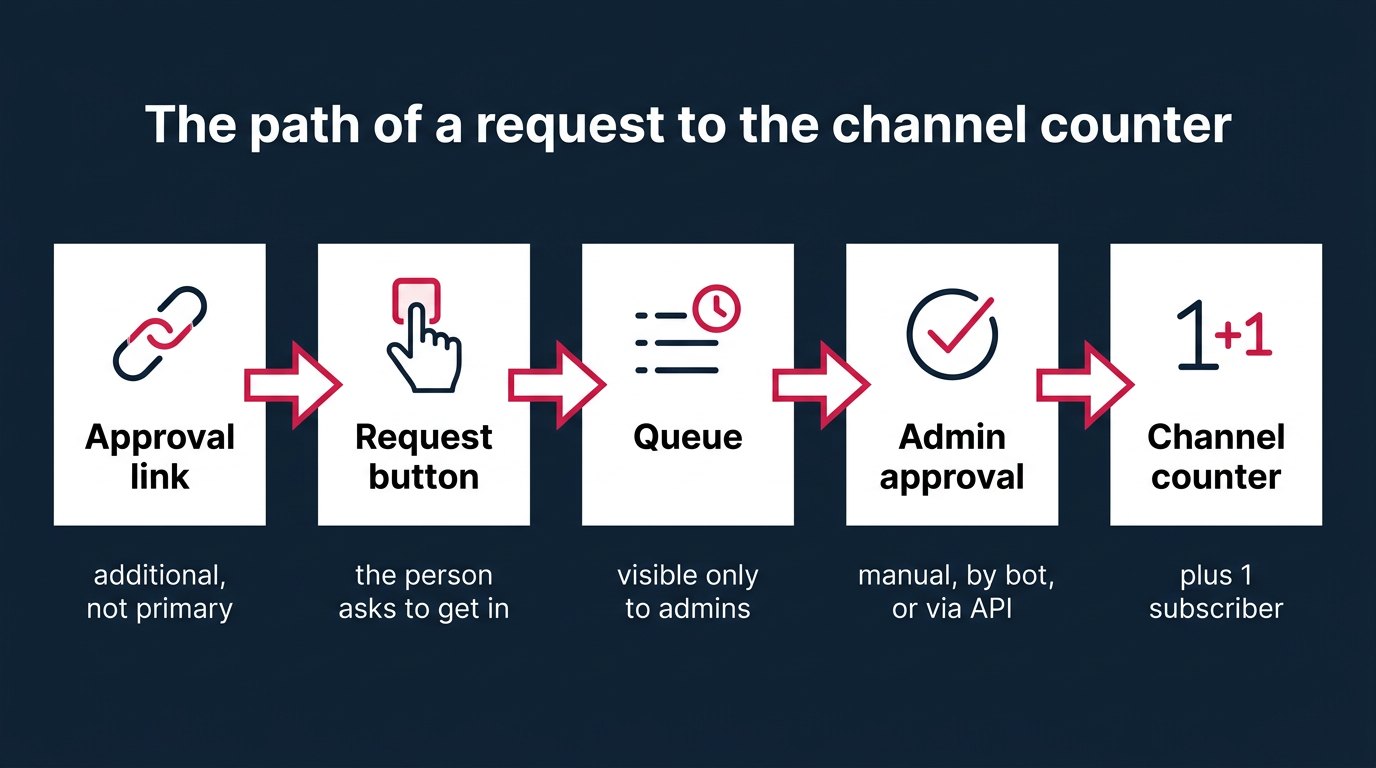
Short answer: in the join request queue, which only the channel admins can see. A person opened the link, tapped the button, and sent a request. That doesn't make them a subscriber. The channel counter doesn't see them, other members don't see them, and they're not in the subscriber list.
Telegram states this directly: until someone approves the request, the person is not a subscriber. A pending request is invisible to everyone except admins. That's where all the confusion comes from. The order has been delivered, but the number under the channel name hasn't moved by even 1.
The second rule people forget: nothing happens on its own. Telegram gives the admin no deadline to respond and does nothing automatically if the admin stays silent. A request can hang for a day, a week, a month. It won't turn into a subscriber by itself, and it won't expire on a Telegram timer. It can disappear for other reasons, which I cover below.
So you get a strange picture. The service did its part, and the people came to the door. The door is locked, and the key belongs to the channel owner. Until he turns it, the order looks unfulfilled.
How a join request link works in Telegram
Join requests appeared in the Telegram update of 3 November 2021. Since then, additional invite links have a setting called Request Admin Approval. Turn it on for a link, and the link stops letting people in immediately: everyone who arrives through it sends a request and waits.
Here's a detail people trip over. Approval only works on additional links, in the Additional Invite Links section. The primary channel link can't require approval. So a private channel can have a primary link that lets everyone in immediately and, at the same time, a couple of additional links that collect requests.
Each additional link can be given a name, up to 32 characters. For an order this is a gift: a link called "order_1000_november" is instantly visible in the list, and you won't confuse it with a link for ads or for friends.
A link has a few more settings:
- a join limit, from 1 to 99,999 people;
- a lifetime: 1 hour, 1 day, 1 week, or No limit;
- a name of up to 32 characters;
- the request toggle, called creates_join_request in the API.
And one rule that changes everything: a join limit and join requests can't live on the same link. If a link requires admin approval, you can't set a limit on it. Either a pass counter or a queue. There are no other options.
Each link keeps its own count of pending requests. You can see separately how many requests came through that specific link. For an order this is the main gauge: it shows how many people actually knocked.
How to create a join request link for a private channel: steps
The path in the app is short, but it's easy to skip steps. Using the English interface, as in Telegram's help pages:
- Open the channel, tap its name, then Edit.
- Go to Invite Links.
- Tap Create a New Link.
- Turn on Request Admin Approval. After that, the join limit field disappears or becomes inactive: this is that "either a limit or a queue" rule.
- Choose the link lifetime. For an order I set No limit; I explain why in the section on settings that break an order.
- Give the link a name, for example "order_1000". Up to 32 characters.
- Save and copy the link. This is the one that goes into the order, not the primary channel link.
Before handing over the link, it's worth opening it from another account or asking a friend to. If instead of the request button he lands straight in the channel, the toggle didn't turn on or the wrong link was copied. 2 minutes of checking save a week of back and forth.
What a person sees after sending a request to a private channel
The person opens the link and sees a button to send a request. In the English interface it's Request to Join. They tap it. Then silence.
There's no queue number. No "you are number 340" message. No waiting counter. The person just knows the request went out, and that's it. If the admin approves it, the channel appears in their list. If it's declined, or a bot removes the request, nothing appears.
For a real person this is annoying; for accounts from a service it means nothing: they don't get nervous and don't write to support. But there's a trap in the silence. If the person taps the button a second time, they withdraw their own request. Minus 1 from the queue, and nobody will know until they compare the numbers.
Where the admin sees the request queue and what you can learn about each person
There are 2 places.
- The bar at the top of the channel chat. When requests come in, Telegram shows it above the feed; tapping it opens the list of people.
- Channel profile, then Edit, then Member Requests. The same list, just calmer, without a bar above your posts.
The list shows the public profile photo and bio of everyone asking to join. Next to each are 2 buttons: approve and decline. That's all the app offers: no filters, no "approve the first 100" button.
Why do admins usually decline requests? The reasons repeat across write-ups: no username, no photo, the account looks automated. Here I'll honestly say something unpleasant. If a channel owner ordered subscribers and then sat down to sort the queue with his usual "no photo, decline" filter, he'll cut part of his own order. The service delivered, the admin declined. A complaint to support after that looks odd, but those emails do come in.
Why the request queue shrinks before approval
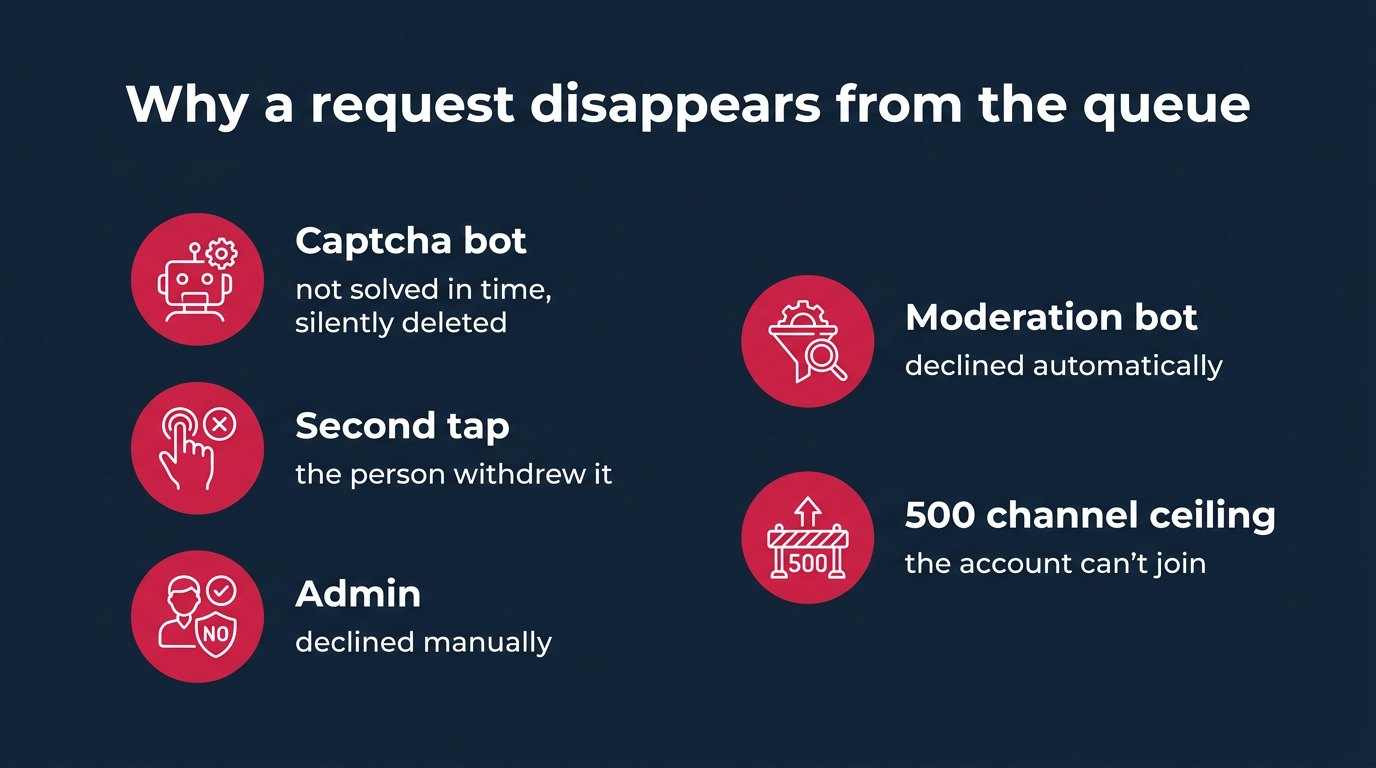
This is something almost nobody writes about. Between "the request arrived" and "the admin tapped approve," a person can vanish from the queue. There are 5 reasons.
A captcha bot. Many private channels and groups use a bot that sends newcomers a task: tap a button, solve a sum, pick a picture. A request that isn't confirmed within the allotted time is deleted without any message. Accounts delivered by a service don't solve captchas. The result is simple: the queue melts while the owner thinks people are sitting in it.
Withdrawal by the person. A second tap on the request button withdraws it. With real people this happens when they weren't sure the request went through and tapped again.
Decline by an admin. One of the admins cleaned the queue by his own rules. If there are several admins, one may have declined what another planned to accept.
Decline by a moderation bot. A filter bot that cuts off accounts without photos or with suspicious names declines requests automatically, with no human involved.
A ceiling on the subscriber's side. A regular account without Premium can, by default, be in no more than 500 channels and supergroups; a Premium account, in 1,000. An account that has hit this ceiling won't join a new channel, and its request never becomes a subscription. The channel owner has no way to see this: from his side it's an ordinary request that didn't turn into a subscriber.
How to tell queue loss from ordinary unsubscribes
This is where people get confused the most. They write: "subscribers are leaving." But they aren't leaving; they never even arrived.
The difference comes down to one thing: whether the person was ever in the counter. An unsubscribe is when a subscriber was there, the counter grew, then dropped. Queue loss is when the counter never grew at all, but the number of pending requests on the link went down.
The check takes 5 minutes:
- Before the order, write down 2 numbers: channel subscribers and pending requests on the order link. On a new link, requests are 0.
- After delivery, write both down again.
- A day later, before any approval, write them down once more.
If subscribers are the same and the link has fewer requests than right after delivery, that's queue loss. Look for a captcha, a moderation bot, a second admin. If the requests were approved, subscribers went up, and then the number started creeping down, those are unsubscribes, and the conversation with the provider is different: about account quality and the guarantee, not channel settings.
Why does it matter so much to separate them? Because the fix is different. The owner fixes queue loss himself: turns off the captcha, coordinates with co-admins. No setting will fix unsubscribes.
Which link settings break a subscriber order
I've collected everything an order to a private channel actually trips over.
A join limit on a link without approval. Say the owner decided to skip requests and set a limit of 100 on the link. The order is for 1,000. After the 100th person the link stops working, and the other 900 hit a dead link. People set limits out of caution and end up with non-delivery.
A limit and approval at the same time. You can't set both: if a link requires approval, no limit can be set on it. Sometimes an owner sets a limit, then turns on approval and thinks the limit stayed. It didn't. A link with requests lets any number of people into the queue.
Link lifetime. A link set to 1 hour or 1 day can expire mid-delivery. An order for 1,000 subscribers rarely arrives within an hour, and everything that didn't make it before expiry hits a closed door with no request button. That's why for the duration of an order I set No limit and revoke the link by hand after checking.
A captcha bot in the channel. Covered above: requests that fail the check are silently deleted. For the duration of the order, the captcha on that link needs to be off, or you're paying for people the bot will throw out.
The primary link instead of an additional one. If the primary link of a private channel went into the order, people join immediately, with no queue. Sounds good, but then the whole order lands in the counter in a single day, and the whole idea of careful approval loses its point.
A revoked link. If the link is revoked before delivery ends, nobody else will come through it. Sounds obvious, but people do revoke it after seeing the first hundred requests and deciding "that's enough."
| Setting | What happens to the order | What to set during the order |
|---|---|---|
| Limit of 100 without requests | the link is dead after the 100th | no limit, or turn on requests |
| Lifetime of 1 hour or 1 day | the link expires mid-delivery | No limit, revoke afterward |
| Captcha bot | requests are silently deleted | turn off during the order |
| Primary link | everyone joins at once, in one day | a separate additional link |
| Link revoked too early | the rest of the order never arrives | revoke after checking the numbers |
What happens to the counter and stats if you approve everyone at once
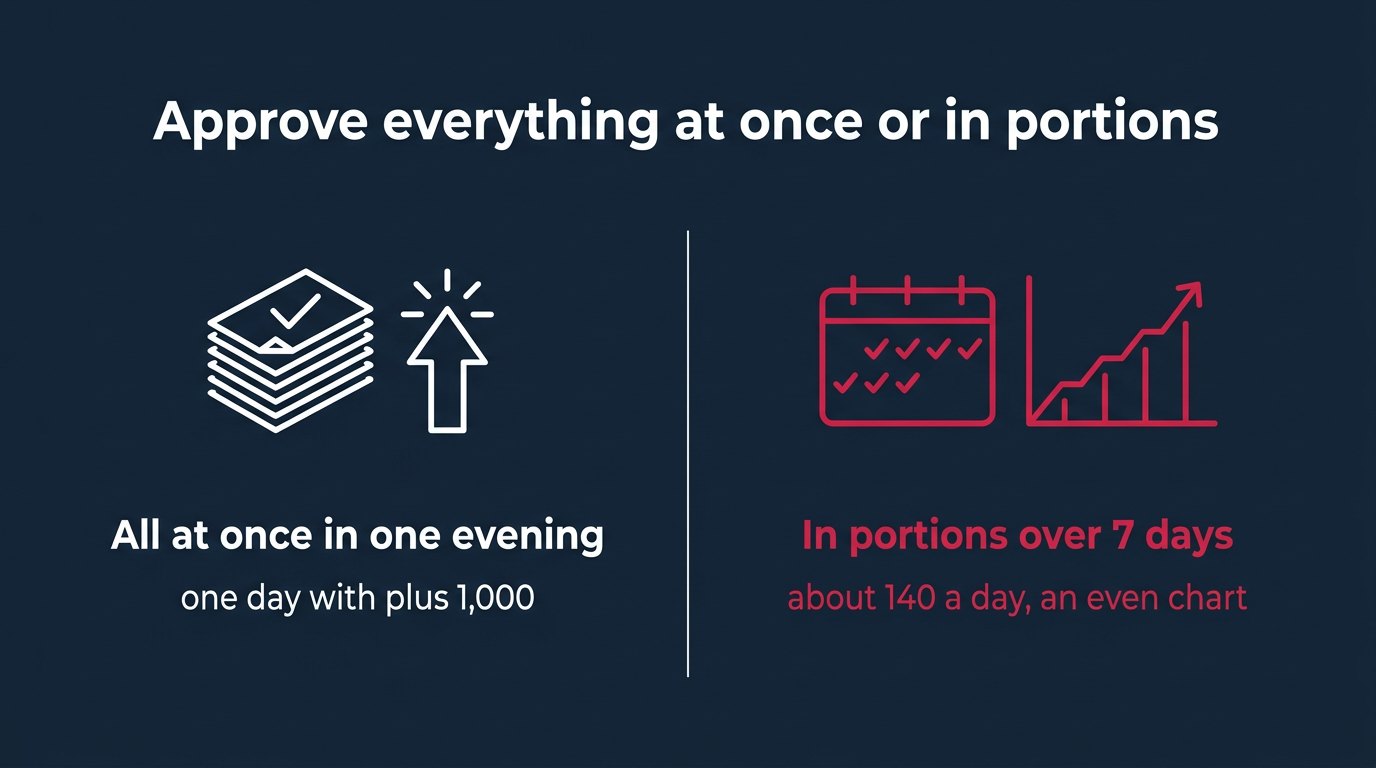
A person becomes a subscriber at the moment of approval, not at the moment of the request. So in the channel stats they'll appear on the day the admin tapped the button.
A simple consequence follows. The order was delivered over a week, requests piled up for a week, and the owner approved the whole queue in one evening. Instead of an even week, the channel growth chart will show 1 day with a plus of all 1,000. A spike. Anyone who looks at the channel stats, an advertiser or a buyer of ad placements, will see that spike first.
The Telegram API makes this easiest: the messages.hideAllChatJoinRequests method approves or declines a large batch of requests at once. Technically convenient. On the chart it looks as if a crowd walked into the channel from a single link in one evening.
What would I do myself? I'd spread approval over roughly the same period the delivery took, or better, a bit longer. The argument is simple: Telegram sets no deadline for the admin, and the queue isn't going anywhere if the captcha is off. Waiting costs nothing. A spike on the chart stays in the stats forever.
How to approve the request queue in portions: 4 ways
There are 4 ways to accept the queue, and each has its price.
By hand in the app. The bar at the top of the chat or Edit, then Member Requests, then the approve button next to each person. Slow, but fully under control: as many as you tap, that's how many get added. For a queue of 100-200 requests a day, that's 10-15 minutes in the evening.
With an admin bot. A bot can approve requests itself only if it's a channel administrator with the can_invite_users right, shown in the interface as permission to add users. Without this right the bot sees requests but can't do anything with them. A bot like this can be set up for portions: so many requests per hour.
Via the API in a batch. messages.hideAllChatJoinRequests accepts or declines many requests in a single call. Handy for cleaning the queue, bad for an even chart: this is exactly the "approve everything" button.
With a userbot. This is a script running from your personal account, for example in PHP with the MadelineProto library; step by step guides for this are publicly available. The problem is rate limits. One developer says it plainly: you can't do more than about 9 approvals in a row before Telegram triggers a flood wait pause. Plus the script holds access to your personal account.
| Method | Speed | Portion control | Risk |
|---|---|---|---|
| By hand in the app | slow | full | only your time |
| Admin bot with can_invite_users | fast | configurable | a bot with rights in the channel |
| API, mass approval | instant | none, all at once | a spike on the chart |
| Userbot | about 9 at a time | manual | flood wait pauses, account access |
I wouldn't use a userbot for this. Not because it's scary, but because there's no point: with a pause after every 9 approvals it's no faster than your hand, yet it holds the keys to your personal account. For an order of a few hundred people, the app and 10 minutes a day are enough. For several thousand, I set up an admin bot with permission to add users and portions by the hour.
Example: an order for 1,000 subscribers to a private channel with requests
A hypothetical calculation to show how all this adds up in numbers. A private channel with 3,000 subscribers and a captcha bot.
Preparation. I create an additional link "order_1000", turn on Request Admin Approval, lifetime No limit. I turn the captcha off for the duration of the order. I write down: 3,000 subscribers, 0 requests on the link.
Delivery. The order runs for several days. The whole time the channel counter shows 3,000. That's normal and expected. The number of pending requests on the link grows.
Check. Say that by the end of delivery the link has 940 requests. That's 60 people short of the order. Since the captcha is off, I look for the other causes: did a co-admin decline anyone, is there a moderation bot. These 60 were lost before the door; they aren't unsubscribes, they were never in the counter.
If the captcha had been left on, some of the 940 would have vanished before approval, and the owner would have seen fewer requests on the link than people who came. That's exactly where "you didn't deliver" emails come from.
Approval. 940 requests over 7 days is about 134 a day. By hand that's a few minutes each evening. With a userbot pausing after every 9 approvals, it would be 940 / 9, about 105 rounds with pauses. Via the API in a batch, all 940 would land on a single day.
- Day 0link "order_1000", captcha off, 0 requests
- Days 1-4delivery, counter stays at 3,000
- Day 5940 requests on the link, check
- Days 5-11about 134 approvals a day
- Day 123,940 subscribers, link revoked
After the last approval there are 3,940 subscribers. I revoke the link. I turn the captcha back on. And only from this day do I count unsubscribes, because only now are these people in the counter.
Public groups with new member approval: a different path
Everything above was about channels and private chats. In a public group, approval is turned on differently, through the group type. The path: Group Info, then Edit, then Group Type, then Who Can Send Messages, choose Only Members there and turn on Approve New Members.
This setting works for public groups, not channels. If you have a channel, there's no point looking for it. If it's a public group, the queue logic is the same: the person joining waits for approval, and the admin accepts or declines. And the same traps: captcha, a second admin, the ceiling on the account's side.
What join requests don't solve
Manual adding doesn't bypass the queue. A channel owner can add up to 200 people from his contacts himself. After that, each new subscriber comes only through a link or finds the channel on their own. The number 200 isn't the channel's limit. Channels have no subscriber limit; 200 only applies to how many people the owner can add by hand.
So the question "can't I just add them myself" doesn't work for an order. Accounts from a service aren't in your contacts, and manual adding stops at the 200th person.
Paid access is a separate story. Owners of paid channels often issue 1 link per purchase, turn on requests for it, and revoke the link after use. The logic is clear: the link can't be forwarded to a friend, because he won't get past the queue. But this setup doesn't fit a subscriber order, which needs one shared link for the whole order.
And the main thing requests don't solve: quality. The queue tells you nothing about who's in it beyond a photo and bio. If you want to understand what the subscribers themselves are and where they come from, that's a separate conversation, not a channel setting. How to order Telegram subscribers and what to expect from them after they join is covered in detail on the service page.
What I'd do as the owner of a private channel in the support client's place
The answer to the client from the beginning is short. Yes, you can send subscribers to a private link with approval. No, the service won't be the one approving them. The service isn't an admin of your channel and has no rights to accept requests. That's your button.
In the owner's place, I wouldn't open the channel up for the sake of an order. The temptation is understandable: remove requests, people come in immediately, no fuss. But then you lose control: you can't spread out the flow, you can't check the numbers per link, and the whole order lands in the stats the way it arrived. A private link with requests gives the owner something an open channel doesn't: deciding on which day and how many people come in.
And I wouldn't clean the queue by photo. If an order is coming into the channel, its queue should be handled separately from everything else: its own link, its own name, its own approval. Otherwise a filter designed for spam cuts what you paid for. If you're unsure how to set up the link for your particular channel, write to support and we'll go through your case.
For those who run a channel and grow it with ads at the same time, there are Telegram promotion services: the same story with requests applies there if the ad leads to a private link.
Questions
Yes. Each person who arrives will send a request and join the queue. They become a subscriber only after a channel admin approves the request; the service can't do that.
Because the people are sitting in the request queue. Until someone approves the request, the person isn't a subscriber and isn't visible to anyone except admins. Check the number of pending requests on the order link.
As long as you like. Telegram sets no deadline for admins and does nothing automatically if the admin stays silent. A request only disappears if it's declined, withdrawn by the person, or deleted by a bot.
Most often because of a captcha bot: an unconfirmed request is silently deleted, and accounts from a service don't solve captchas. Other causes: a second tap of the button, a decline by an admin or a moderation bot, or the 500 channel ceiling on an account without Premium.
No. If a link requires admin approval, no join limit can be set on it. A limit from 1 to 99,999 only works on links without requests.
The API has the messages.hideAllChatJoinRequests method, which accepts requests in a batch. But then the whole order lands in the stats on a single day. It's better to spread approval over several days, by hand or with an admin bot that has the can_invite_users right.
No, the primary link can't require approval. Requests can only be turned on for additional links in the Invite Links section.
What to do
- Create a separate additional link for the order: Edit, Invite Links, Create a New Link, turn on Request Admin Approval, lifetime No limit, a name like "order_1000".
- Turn off the captcha bot and moderation bot for the duration of the order, and warn co-admins not to clean the queue.
- Write down 2 numbers before the order and after delivery: channel subscribers and pending requests on the link.
- Approve the queue in portions over as many days as the delivery took, by hand or with an admin bot.
- After the last approval, revoke the link, turn the captcha back on, and start counting unsubscribes from that day.
Writes about: SMM, paid boosts, ads, traffic, suppliers, the market from the inside, daily news