Where your watch hours go missing on the way to monetization


You open Analytics in YouTube Studio: just over 5,000 hours for the year. You open the Earn tab: the bar sits at 2,800 out of 4,000. First you think it's a delay, then a bug, then you start drafting a message to support. None of that is it. These are 2 different counters, and the one in the Earn tab deliberately throws out part of your hours. Below: what exactly it throws out, which creator actions wipe hours on their own, how to reconcile the numbers on your channel, and what to get done before February 1, 2027, when the threshold for new channels doubles.
Which YouTube monetization thresholds apply before and after February 1, 2027
The YouTube Partner Program (YPP) lets a channel earn from ads. To apply, you need 1,000 subscribers and 1 of 2 conditions: 4,000 qualified watch hours on long form videos over the last 12 months, or 10 million qualified Shorts views over the last 90 days.
From February 1, 2027, the thresholds for new channels change: 8,000 qualified watch hours over the last 365 days or 20 million qualified Shorts views over 90 days, still with 1,000 subscribers. Channels already in the program are not affected. YouTube announced the change on August 10, 2026 in the post "New opportunities to earn and changes to the YouTube Partner Program".
The same post changed the vocabulary. The metrics used to be called "valid public views" and "valid public watch hours". Now they are "qualified views" and "qualified watch hours". The rename looks cosmetic, but the word is chosen precisely: not everything people watched counts, only what passed the filter.
There is also a lower tier of the program, and it isn't changing: 500 subscribers, 3 public videos in the last 90 days, and 3,000 qualified watch hours over 12 months or 3 million qualified Shorts views over 90 days. It's an early entry into the program without full ad monetization. The hours counter for it is the same, so everything below applies to it too.
What YouTube counts as a qualified watch hour
The official wording is short: "To count as qualified, watch hours have to come from public long form videos (including podcasts) or archived livestreams". Hours count from public long form videos (podcasts count as long form too) and from livestream archives that stay on the channel.
What never counts:
- private videos;
- unlisted videos;
- deleted videos;
- views from ad campaigns;
- Shorts;
- livestreams whose archive is unlisted, deleted, or never saved.
Then there is the rolling window. The counter looks at the last 12 months, 365 days. Every day, hours earned a year and 1 day ago drop off. That's why the Earn bar can creep down even if you upload every week: an old video that spiked a year ago stops pulling its weight, and the new ones are still building slowly.
The counter doesn't accumulate. It only remembers the last year and forgets it a little more every day.
What Analytics shows and what the Earn tab shows
Analytics in YouTube Studio shows all watch time for whatever period you pick. That includes Shorts, unlisted videos, private videos, views from ads, and even deleted videos, as long as they fall inside the selected period. It's an honest record of how much people watched. It isn't built for monetization.
The Earn tab (labeled Monetization in some interface languages) shows only the qualified total. That is the number that decides whether you can apply. It has 3 separate bars: subscribers, hours over 12 months, and Shorts views over 90 days. There is no other place in Studio where the correct number appears.
A separate note on the public counter under a video. Since August 24, 2026, a view counts from the moment real playback starts, on any format. The counter under a video became faster and more generous. It has nothing to do with qualified hours, and the gap between the number under the video and the Earn bar only grew because of it.
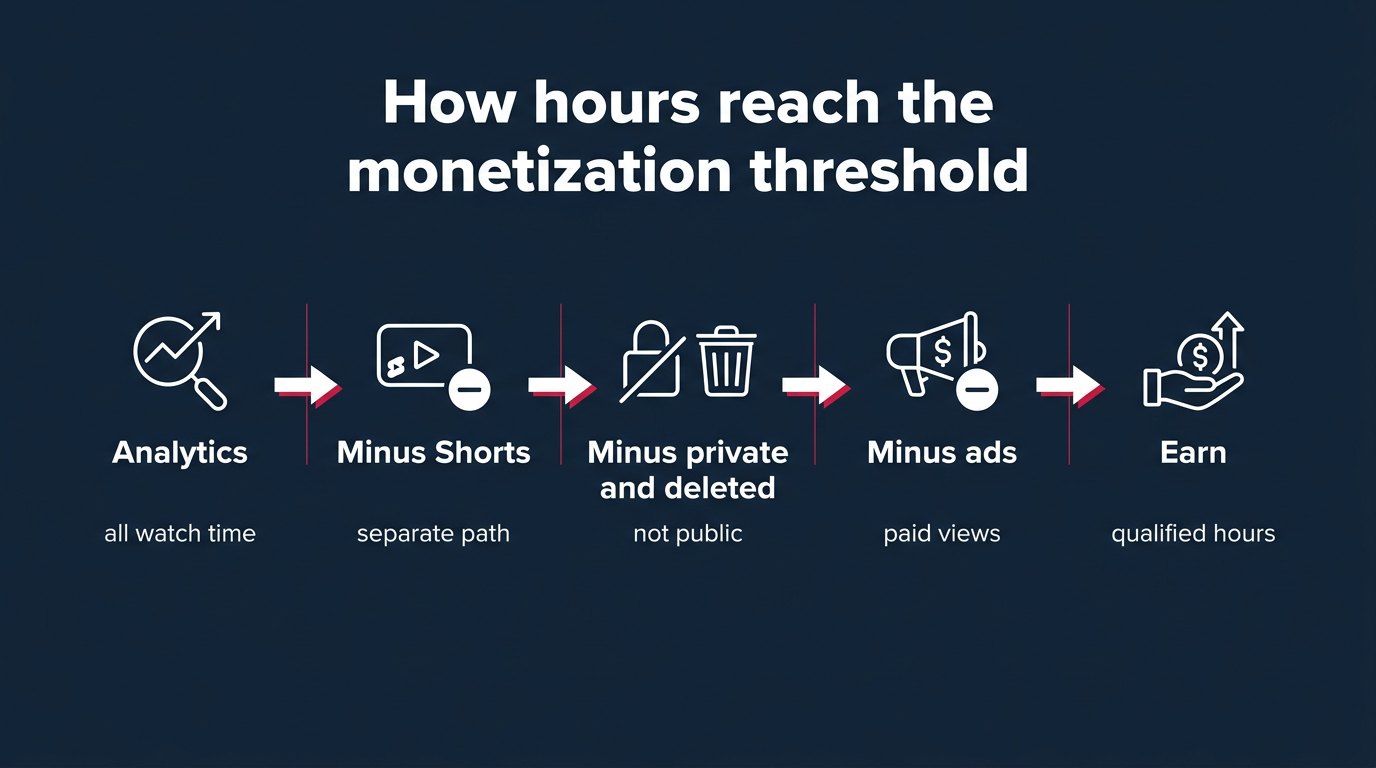
Which hours count toward the 4,000 threshold: a table
A summary table that makes it easy to check your channel. On the left, the type of content; on the right, whether it goes into qualified hours.
| What was watched | In Analytics | In Earn |
|---|---|---|
| Public long form video | yes | yes |
| Podcast, public | yes | yes |
| Livestream archive, public | yes | yes |
| Unlisted video | yes | no |
| Private video | yes | no |
| Deleted video | yes | no |
| Livestream without archive or with a closed archive | yes | no |
| Views from YouTube ads | yes | no |
| Shorts | yes | no, that's a different path |
| Artificial traffic | possibly | no |
The last row is about fake engagement and bots, there's a separate section on that below. For now, one point is enough: Analytics may show those views, Earn will filter them out.
Why Shorts don't add hours to the long form threshold
This is the most common question, and the answer is blunt. Hours earned by Shorts in the Shorts feed do not go toward the 4,000 hour threshold. The 2 paths, long form hours and Shorts views, never add up. A channel with 3,000 hours and 7 million Shorts views qualifies on neither.
Shorts have their own filter. A qualified Shorts view has to come from a public video and be an "engaged view": the viewer watched past the first few seconds. Replays of a looping video don't count. Photo posts shown in the Shorts feed are excluded too.
What does this mean for a channel that makes both? Shorts are useful as a funnel: someone sees a short video, goes to the channel, watches a long one. That next view counts. The short itself will never turn into hours, no matter how many times it plays.
How to reconcile Analytics with the Earn tab yourself: step by step
This is missing almost everywhere, even though it takes half an hour. The idea is simple: from total watch time you subtract, one by one, everything the filter throws out, and check whether what's left matches the Earn bar.
- Open YouTube Studio, then Earn in the left menu. Write down the 3 numbers from the bars: subscribers, hours over 12 months, Shorts views over 90 days.
- Go to Analytics and click "Advanced mode" in the top right. Set the period to "Last 365 days" and the metric to "Watch time (hours)". Write down the total.
- In advanced mode, find the breakdown by content type. Videos, Shorts, and live are listed separately. Write down the Shorts hours and subtract them from the total.
- Open the "Traffic source" breakdown. Find the row "YouTube advertising". Those are hours that came from paid promotion through Promote or Google Ads. Subtract them.
- Go to Content and filter the list by "Visibility": unlisted and private. For each of those videos, check watch time over 365 days, add it up, and subtract.
- In Content, open the "Live" tab. For every past livestream, check whether the archive was saved and whether it's public. Subtract the hours from closed and unarchived streams.
- Compare what's left after all the subtractions with the Earn bar. A difference that steps 3 to 6 don't explain almost always comes down to deleted videos and filtered low quality traffic.
Step 7 is the unpleasant one: you can no longer find a deleted video in Content, but its hours may still sit in the yearly Analytics total. If you remember cleaning up the channel, there's your answer.
One more caveat on step 4. Subtract only the "YouTube advertising" source. People who found you through an ad and then came back on their own to watch other videos arrive through other sources: home, suggested, subscriptions. Those hours count, leave them alone.
Worked example: 5,200 hours in Analytics, 2,800 counted
Let me take a hypothetical channel, the numbers are for the calculation, not from a real account. Analytics for 365 days shows 5,200 hours. The creator is sure the 4,000 threshold is passed and can't understand why the Earn bar is stuck at 2,800.
Let's go through the steps from the previous section:
- Shorts: 900 hours. 4,300 left.
- "YouTube advertising" source: 600 hours, the creator promoted 2 videos. 3,700 left.
- Unlisted and private videos: 300 hours, these are videos for a client and a couple of drafts. 3,400 left.
- Livestreams with a closed archive: 400 hours. The channel has fewer than 1,000 subscribers, the streams ran from a phone, and the archive was saved as private. 3,000 left.
- Deleted videos: 200 hours, in the spring the creator removed 3 old videos "so they wouldn't embarrass the channel". 2,800 left.
It matches the bar. No bug. The gap to 4,000 is 1,200 hours, which is 72,000 minutes. At an average view duration of 4 minutes, that's another 18,000 qualified long form views. If the creator doesn't make it by February 1, 2027, the gap to the new 8,000 hour threshold will be 5,200 hours: 312,000 minutes, or 78,000 views at the same 4 minutes. That's 4.3 times more.
What can the creator fix in this example? Open up the livestream archives. Hours earned while the archive was closed won't come back retroactively, but from the moment it opens, new views will count. The 200 deleted hours will never come back. The 600 ad hours won't count under any circumstances. Shorts remain a separate path.
Which creator actions wipe hours before applying
The most painful part of this topic: creators lose a big share of their hours with their own hands. Usually with the best intentions. Before applying, you want to tidy up the channel, and that "tidying up" hits the counter directly.
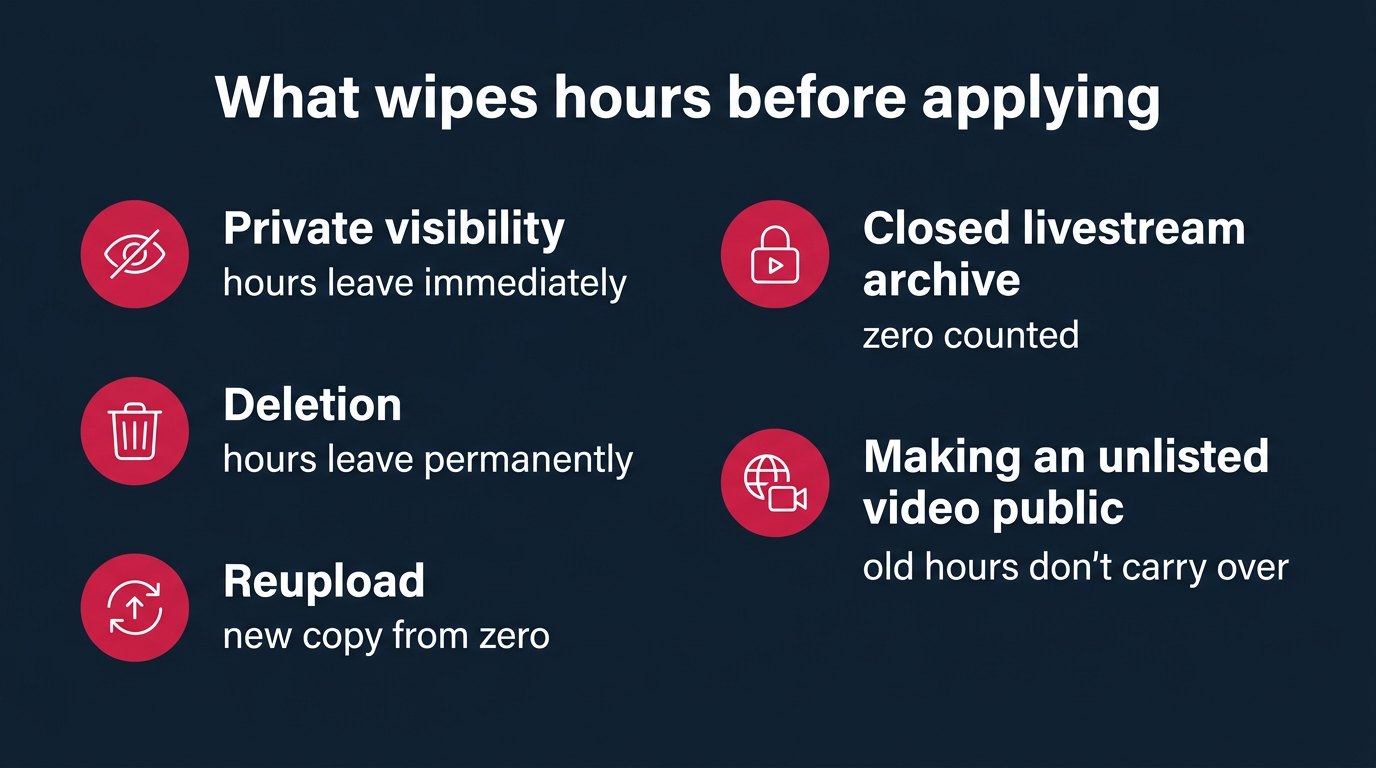
What wipes hours:
- Switching an old video to private or unlisted. Its hours leave the qualified total immediately.
- Deleting a video. The hours go with it, permanently.
- Reuploading. The new copy starts from zero, the original's hours disappear. The creator thinks the video got better, the counter sees one deletion and one new upload.
- A private livestream archive. In the YouTube mobile app, for channels with more than 50 and fewer than 1,000 subscribers, the archive is "set to private by default". If you didn't check after the stream, those hours passed you by.
- A deleted or unsaved livestream archive. The stream happened, people watched, zero counted.
- An unlisted video you later made public. Hours earned while it was unlisted don't carry over.
A separate word on the rolling window. You can't turn it off, but keep it in mind when planning: if you had a spike a year ago, the bar will start dropping on its own in a couple of months.
What I would do myself. Until the application is approved, I wouldn't touch a single old video. Not the clumsy one, not the embarrassing one, not the one with bad audio. Let it stay public and bring in its 40 hours a year. You can clean up the channel later, once you're in the program, and even then with an eye on the activity rule for partners, more on that below. The argument is simple: deleted hours don't come back, and embarrassment over an old video fades.
One more thing: after every livestream I would open Content, the Live tab, and check that the archive is public. Every time, especially if the stream ran from a phone and the channel has fewer than 1,000 subscribers. It takes a minute. A missed archive of a 2 hour stream with a hundred viewers costs up to 200 hours that you'll never get back.
Why bought and ad hours don't reach the threshold
I'll start with YouTube ads, because they're legitimate and still don't help with the threshold. Subscribers and hours gained through YouTube ad campaigns (the Promote button in Studio or Google Ads) don't count toward the program thresholds. You see them in Analytics, not in Earn. What counts is what people who came from an ad watched afterward on their own, without an ad impression.
Does that make ads useless for a channel near the threshold? No, they bring people who then watch organically. But you can't count ad hours as a step toward 4,000. You pay for 600 hours in Analytics, and in Earn you only see what viewers watched later on their own.
Now about fake engagement. YouTube's policy on fake engagement is direct: "Page traffic found to be artificial will not be counted on YouTube and can lead to strikes on your account". Artificial traffic isn't counted and can lead to strikes, warnings for policy violations. On top of that, YouTube treats playback on several devices or in several tabs at once as low quality and may discard it.
Here I'll be honest, even though mrpopular sells this itself. Buying YouTube views works as social proof: the number under the video, an initial push, a channel that looks alive to a random viewer. For the monetization threshold it's useless and risky. Analytics may show bought hours, Earn will throw them out, and the channel gets a chance of a strike right when you apply. Sellers of "4,000 hours in a week" promise exactly what the filter was built to cut off.
One more position, also stated plainly. If the goal is the Partner Program specifically, promotion money is better spent on what brings people to long form videos and keeps them watching: ads for a specific video aimed at subscriptions and return visits, not at the ad hours themselves. Ad hours won't count, but a person who comes back on their own for the next video is already counted. Bought hours don't even give you that.
How many views you need for 4,000 and 8,000 hours
The math is simple, but almost nobody does it, which is why the threshold feels abstract. 4,000 hours is 240,000 minutes. 8,000 hours is 480,000 minutes. Divide the minutes by the average view duration of your long form videos and you get the number of qualified views you need.
| Average view duration | Views for 4,000 hours | Views for 8,000 hours |
|---|---|---|
| 2 minutes | 120,000 | 240,000 |
| 4 minutes | 60,000 | 120,000 |
| 6 minutes | 40,000 | 80,000 |
| 8 minutes | 30,000 | 60,000 |
| 10 minutes | 24,000 | 48,000 |
Check average view duration in Analytics, but only for long form videos, filtered by content type. If you take the overall number including Shorts, it will be too low, and the calculation will lie.
The table shows the main point: raise the average view from 4 to 8 minutes and the number of views you need is cut in half. That's stronger than doubling your reach, and usually easier.
How to earn hours honestly: what works in long form videos
The advice in the top guides mostly comes down to one thing: keep the viewer longer and move them on to the next video. It's worth breaking down, because half of it works and half is presented as magic.
The first 30 seconds. That's where most viewers leave, and the retention graph in Analytics will show you the exact second. Starting with the substance instead of a greeting and a channel intro: that works. Promising "watch till the end, the best part is coming" without the best part doesn't work: the retention graph sees it, and so does the viewer.
End screens and playlists. An end screen, meaning a link to the next video in the last 20 seconds, and a playlist that automatically starts the next video, give you hours without new viewers. The person is already here, they just keep watching. For a channel near the threshold, that's the cheapest source of hours.
Captions. They widen the circle of people who can watch: without sound, in another language, with hearing loss. I'm not promising miracles, but these are extra minutes from people who would otherwise have closed the video.
Livestreams. An honest source of hours: streams are long, people stay a while. But only under one condition: the archive is saved and public. A stream with a private archive gave Analytics a nice number and Earn a zero. That's the section above, and I'll repeat it at the end, because this is where people lose the most.
Podcasts. They count as long form videos, and that's worth using: a 40 minute podcast with an average view of 10 minutes gives more hours than 3 videos of 5 minutes each.
What doesn't work: watching your own videos on several devices, asking friends to leave a video open in a tab, "view exchange" services. YouTube explicitly calls this low quality playback and discards it. The hours go away, the risk stays.
How to apply and what happens during review
When the channel crosses any of the thresholds, YouTube sends an email. The email itself isn't an application. The application starts in the Earn tab, and review begins only after you complete every step: accept the program's base terms and link an AdSense for YouTube account. AdSense is the Google service the Partner Program pays through. Until it's linked, the application isn't sent for review, no matter how many hours you have.
According to YouTube, a decision arrives "typically in about 1 month". After the 1st rejection you have 21 days to appeal, or you can reapply after 30 days. After a second rejection, you'll have to wait 90 days.
- Day 0all steps complete, AdSense linked
- About 30 daystypical decision time
- Up to 21 days after rejectionappeal window
- 30 days after rejectionreapply
- 90 days after second rejectionnext attempt
Now the good news. Once you've applied, it doesn't matter if subscribers or hours drop below the threshold while it's under review. The rolling window may eat 200 hours during a month of review, and that's not grounds for rejection.
And the bad news. If you make videos private or delete them during review, in YouTube's words this "might impact the status of your application". So the "don't touch anything" rule applies not until you apply, but until the decision.
About the January 31 deadline. A partner agency writes that an application that reaches YouTube by 23:59 UTC on January 31, 2027 will be judged against the 4,000 hour threshold, even if the decision comes weeks later. YouTube's help pages don't contain that wording, it's the agency's interpretation. What I would do myself: I wouldn't count on the last evening. An application has "reached" YouTube only after AdSense is linked and the terms are accepted, and linking AdSense sometimes requires verifying your details. I'd apply as soon as the bar shows 4,000, not on the last day.
What changes for channels already in the Partner Program
The new thresholds of 8,000 hours and 20 million Shorts views apply only to new channels. If you're already in the program, they don't affect you. But partners have 2 things to do as well.
- To keep full monetization, you need to read and accept the updated terms in YouTube Studio by January 31, 2027. If you don't accept them, full monetization is in question.
- From February 1, 2027, there's an activity rule. A channel counts as active if it has 1,000 qualified watch hours over the last 365 days, or 1 million qualified Shorts views over the last 90 days, or uploads 2 long form videos or 5 Shorts every 90 days. For a channel that has lived off old videos for years, this is a reason to start uploading again, at least the minimum.
The same counter logic applies here. The same qualified hours, the same filter. A partner who mass closed old videos after approval may discover they no longer reach 1,000 hours a year.
Questions
No. Hours earned by Shorts in the Shorts feed don't go toward the long form threshold. Shorts have their own path: 10 million qualified views over 90 days, and from February 1, 2027, 20 million for new channels. The 2 paths never add up.
Analytics shows all watch time: Shorts, unlisted, private, deleted, views from ads. Earn shows only qualified hours from public long form videos and public livestream archives over the last 12 months. These filters almost always explain the gap, not a delay or an error.
Yes, if the archive is saved and public. A stream with no archive, a deleted archive, or an unlisted archive doesn't count. For channels with 50 to 1,000 subscribers streaming from a phone, the archive is private by default, and you have to make it public manually.
Yes, permanently. Switching to private or unlisted also removes the hours from the total. A reupload starts from zero, and the original's hours don't carry over to the new copy.
No. Hours and subscribers gained through Promote or Google Ads don't count toward the thresholds. What counts is what people who came from an ad watched afterward on their own.
No. Hours before you join the program only serve to pass the threshold. Money starts after the application is approved, the terms are accepted, and AdSense for YouTube is linked, from ads shown on videos after that point.
Nothing bad. Once you've applied, a drop in subscribers or hours below the threshold doesn't affect the decision. Something else can: if you close or delete videos during review, YouTube warns this may affect the status of your application.
What to do
- Open the Earn tab and write down the 3 numbers. Only they decide whether you can apply.
- Run the step by step reconciliation from the section above: subtract Shorts, the "YouTube advertising" source, private and unlisted videos, closed livestream archives. Figure out where the difference went.
- Make public every livestream archive you're comfortable showing, and after every new stream check that the archive is public.
- Use the table to calculate how many views you need for 4,000 hours at your average view duration, and compare that with the January 31, 2027 deadline.
- Don't delete, close, or reupload a single old video until the application is decided. You can clean up the channel later. Lost hours never come back.
Writes about: SMM, paid boosts, ads, traffic, suppliers, the market from the inside, daily news

 Anna