How Google Chooses Links for AI Answers


On November 24, 2026, Google published a page on Search Central, its documentation site for website owners, explaining how AI Overviews and AI Mode choose which sites to link to. AI Overviews is the block with an AI-generated answer above the regular search results. AI Mode is a separate search mode where the model builds the entire answer. On the same day, Google launched the Search Ranking Hub and announced the December core update in advance, meaning a major update to its core ranking algorithm. Below I break the selection process into 4 steps and untangle the confusion between the Search Console toggle and Google-Extended. I also explain how to capture a baseline before the December update, so you have something to compare against afterward.
The 5 pages Google published on November 24, 2026
On November 24, 2026, Google published 5 pages:
- Google Search ranking hub, a general section covering everything about ranking;
- How to stay informed on Google Search ranking updates, about how to track updates;
- Submit feedback about ranking changes in Google Search, a form for complaints and feedback about ranking swings;
- Our principles for ranking results, the principles Google uses to rank results;
- Attribution and factuality in Search generative AI features, a document about which sites the AI features in Search link to and how facts are checked.
For website owners, the last one matters most. I read it 2 times. On the second pass I wrote each condition on its own row in a spreadsheet, because otherwise it is easy to lose track of what is required and what is merely recommended.
The page introduces no new rules: it describes a practice that is already in place. So nothing "broke" on November 24. What changed is this: things SEO specialists used to argue about based on indirect evidence are now written down by Google itself.
Why Google wrote this in November 2026
The UK regulator CMA, the Competition and Markets Authority, ruled on June 17, 2026 that Google must rank results fairly and comply by December 17, 2026. The ranking principles document came out on November 24, 23 days before that deadline. Google does not state the reason for publishing, but the timeline is easy to read: the company needs to show the rules by which it selects results.
That is also where the main principle in Our principles for ranking results comes from. All result types, meaning web links, AI Overviews, carousels, images and videos, are judged by the same standard of helpfulness. There are no manual adjustments, except where the law and Google's content policies require them. For a website, this means there is no separate "AI shelf" with its own rules.
Before November 24: AI Overviews advice rested on guesswork
Before the publication, advice on "how to get into AI Overviews" was pieced together from observation. The model of "classic ranking first, then Gemini" was described based on experiments, with no official confirmation. Against that backdrop came recommendations to rewrite content as "question and answer," add FAQ markup and regularly refresh the publication date so the page looked new.
The case for fighting for a spot in the overview is usually made in terms of brand trust and "warmer" traffic. The first half of that argument holds up against Google's facts. A link in an AI Overview sits next to a specific claim that the page supports: the document calls this corroboration. In the source carousel it appears with the site name, favicon and article title. A person sees the site's name right next to a fact they trusted, and that is a real reason to remember the brand. The second half is trickier. Google keeps moving links lower inside AI Overviews, ppc.land reports, and clicks from AI answers in Search Console are mixed into the regular Performance report. So the "warmth" of overview traffic cannot be measured separately. I would treat a spot in the overview as brand visibility, not as a guaranteed stream of especially purchase-ready visitors.
Now the old advice has a reference point. The document's central claim: the AI features in Search use a specially tuned Gemini model, Google's language model, and that model is built directly into the core ranking, retrieval and quality systems. There is no separate crawler that reads websites by its own rules. There is the same Search, with a text generator added on top.
It also became clear how an AI Overview differs from a Featured Snippet. A Featured Snippet shows a quote from a single page. An AI Overview writes new text from several pages and links to the ones that support what it says.
Step 1: regular search results form the base of the AI overview
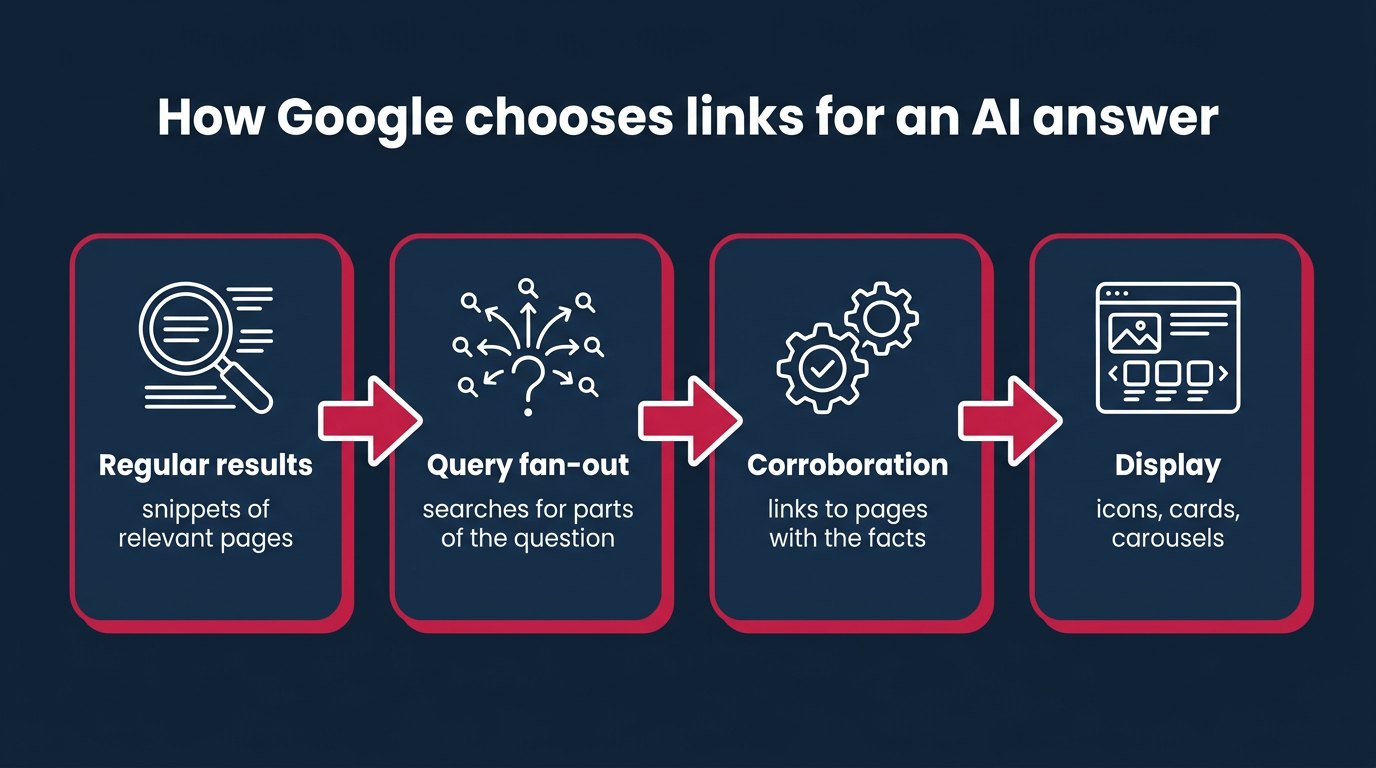
For AI Overviews, the system first assesses how relevant the regular results are for the query. Then it passes the model the snippets of those pages, the short text fragments Google already shows under the title in search results. The model builds the base of the overview from these fragments.
The practical takeaway is simple. A page that ranks high and has a good snippet is the first to land in the source material for the AI answer. If a page's snippet is vague, the model gets vague material, even when the text on the page itself is good.
Step 2: query fan-out, extra searches for parts of the question
Next, the model may run 1 or more related searches across Google's index. This technique is called query fan-out. A complex question gets broken into parts, and pages are found for each part.
Google does not list which queries trigger an overview. People often say it is "how to" questions, comparisons and instructions, and the mechanism supports that claim. A comparison of 2 products or a step-by-step task is compound by nature: the model splits it into parts through query fan-out and assembles the answer from several pages. According to Google's announcement, the December core update targets, among other things, answers to long and complex questions, which is exactly this zone. The flip side is also named in the document. For YMYL topics (health, money, law) and breaking news with few publications yet, there may be no overview at all if Google lacks reliable consensus. A short query with a single answer, or news that is an hour old, more often stays with regular results.
An example: someone asks how to choose a treadmill for an apartment when neighbors live below. The model may separately search for treadmill noise levels, floor load and folded dimensions. A page that answers only the noise question well can make it into the overview, even though it is not in the top results for the original long query.
This explains a figure from the Surfer AI study from November 2026 across 405,576 queries: 52% of pages cited in AI Overviews also rank in the top 10 of regular results. The remaining 48% came from outside the first page, and query fan-out looks like the main path by which they got there.
Step 3: fact corroboration decides whose link sits next to the answer
The model assembles the answer from the results it found and links to pages that support the information. The document calls this corroboration. The link does not go to whoever wrote most beautifully, but to the page that confirms a specific claim in the answer.
There is a parallel here with how people decide what to believe in general. A fact retold by 3 independent acquaintances feels more reliable than a fact from one person, even a very convincing one. The model behaves similarly: it looks for agreement among several sources. If your page disagrees with all the others on a number or a date, it is more likely to drop out than to become the "unique opinion" in the answer.
The practical consequence: every verifiable claim on a page should be phrased so it can be cut out and checked. "Delivery within London takes 2 days" corroborates an answer. "We deliver fast" gives nothing to corroborate.
A separate note on backlinks and topic clusters, meaning groups of related articles on one topic: they are often called the entry ticket to the overview. Google's document says nothing about the weight of links, so there will be no numbers here. But 3 facts add up to a clear picture. Corroboration is built on agreement among several sources. At step 4, the display format accounts for source diversity. And in the November core update, templated subfolders targeting queries far from the core business lost ground. Conclusion: what works is topical coherence, when a site writes in depth and consistently about its own field and its facts match other reliable sources. Mass pages outside that field do not work: in the November results, they dragged sections down.
Step 4: where and how a site link appears in the answer
Links appear in 3 forms: icons right in the answer text, grouped source cards and expandable carousels. The carousel shows the site name, the favicon (the small site icon in the browser tab) and the article title.
Which form a link gets depends on 3 things: relevance and quality signals, how clear the page layout is on desktop and mobile, and source diversity. The last one matters: if the answer already has 2 links to one site, a third is more likely to go to another domain.
There is bad news too, reported by ppc.land: Google keeps moving links lower inside AI Overviews. A spot in the overview no longer equals a click, because a person may simply not scroll down to the link.
The entry threshold: indexing and an allowed snippet
For a page to be cited at all, 2 conditions must be met: it is indexed, and it is eligible to show a snippet. Even together, these conditions guarantee nothing; they only admit the page to the selection.
You can check both in 5 minutes:
- In Search Console, open URL Inspection and paste the page address. The status should be "URL is on Google."
- In the same report, check whether indexing is allowed and whether there is a noindex directive.
- Open the page source and find the robots meta tag. If it contains nosnippet or max-snippet:0, the page has no snippet, and with it, no right to be cited.
- Check the data-nosnippet attribute: it is used to hide individual blocks of text. If it sits on the main content, the model will not see that text.
Core Web Vitals, the metrics for page loading speed and stability, are not named among the selection conditions in Google's document. Only one thing follows from step 4: the link display format takes into account how clearly the page is laid out on desktop and mobile. So it is worth opening the mobile version of key pages on a phone and checking that the text reads without horizontal scrolling and the main block is not hidden behind pop-ups.
The official 4-step model also does not name Schema.org structured data as a separate condition. Article or Product markup helps Google understand the page, but it is not a required pass into AI Overviews. Advice like "add FAQPage and you will get into the overview" is not supported by the document.
What Google explicitly recommends and forbids: dates, errors, authorship
The recommendations in the document are short and specific:
- keep important information accurate and up to date;
- check pages for factual errors;
- do not change a page's date if the content has not substantially changed;
- provide clear sources for claims;
- have author pages and an "About us" page.
The third point is a direct ban on a trick that was sold for years as a "freshness signal": changing "Updated 2025" to "Updated 2026" and touching nothing else. Google says it plainly. If the date changed and the text did not, the page sends a false signal. For a model that cross-checks facts, that is a reason to trust the page less.
Author pages and "About us" are not there to tick a box in an audit. When the model decides which page to trust for corroborating a fact, it needs to understand who wrote it and whether there is a real organization behind the site. An anonymous blog without a single name loses that check before the text even comes into play.
Sensitive topics: when there is no AI answer at all
For sensitive topics, Google sets a higher quality bar, and an AI answer may not appear at all if there is no reliable consensus on the question. Google gives 2 examples. The first: YMYL topics, Your Money or Your Life, meaning health, money, law and safety. The second: breaking news with few publications so far.
For sites about medicine, finance and legal services, this means that for some queries there will be no spot in AI Overviews, however well the page is built. Fighting for the overview there is pointless, but fighting for regular results remains. News sites should keep in mind that in the first hours after an event there is often no AI answer, and all traffic goes to classic results and the news block.
Who this affects and who it does not
It affects everyone who gets Google traffic to a blog, an online store or a service website. Informational sections are hit hardest: according to Search Engine Journal's analysis of the November core update, blogs and other content sections fell sharply, while product and brand pages held up.
It matters less for sites where almost all traffic is branded: a person searches for the company name and lands on the site. It also does not apply to other search engines and their AI assistants, which run on their own rules that Google's document does not describe.
The Search Console toggle, Google-Extended, nosnippet and noindex: the difference
This is where search results are most confused. Many top-ranking articles present Google-Extended as a way to opt out of AI answers, even though Google directly refutes this. I put the 4 tools into one table.
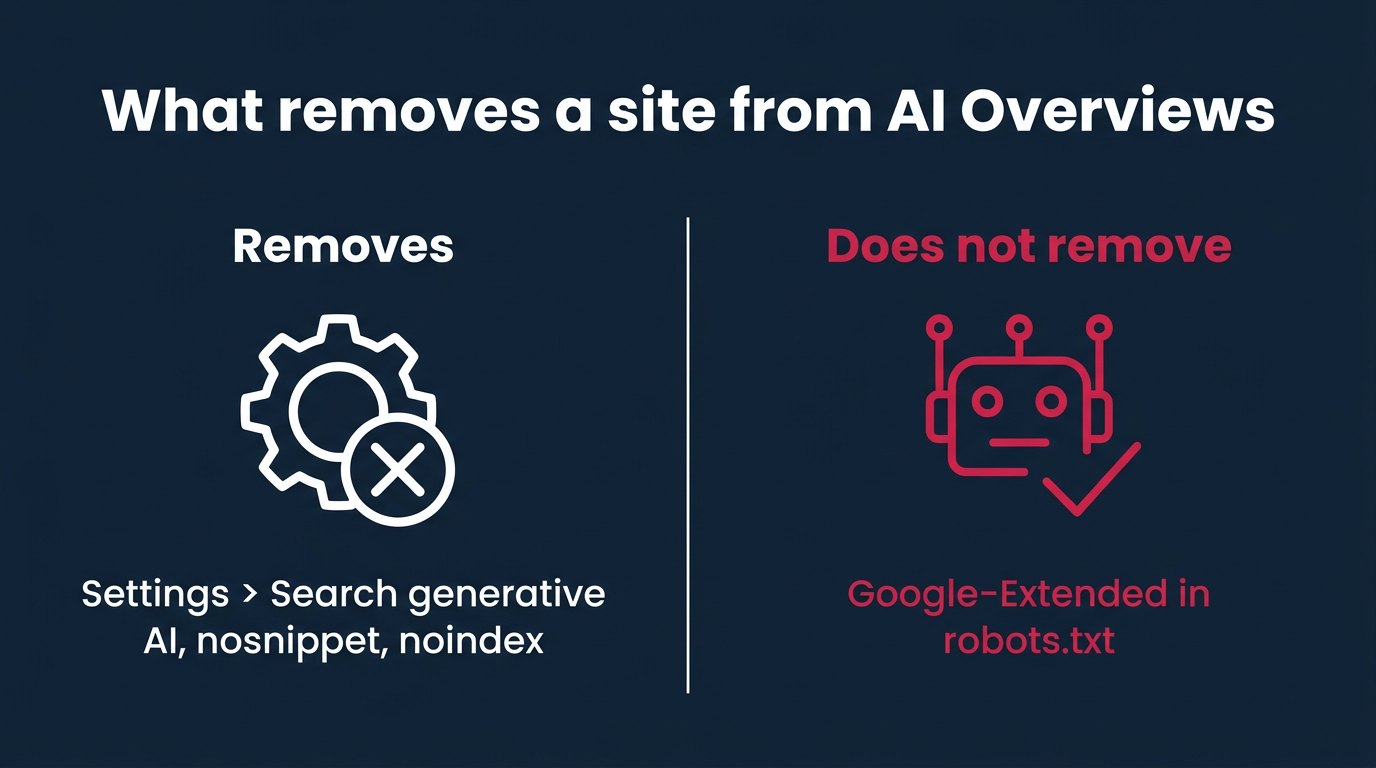
| Tool | What it does | Removes from AI Overviews | Affects regular results |
|---|---|---|---|
| Settings > Search generative AI | toggle for appearing in AI features in Search | yes, within 1 to 2 days | no |
| Google-Extended in robots.txt | limits AI training and grounding outside Search | no | no |
| nosnippet | blocks the snippet | yes, no right to be cited | yes, the snippet disappears |
| noindex | removes the page from the index | yes | yes, the page is not in Search |
The toggle lives in Search Console under Settings > Search generative AI. Since August 31, 2026, it has been available to all sites worldwide. There are 3 options: Include (on, the default), Exclude and Inherit control from parent (take the setting from the parent property). After switching, content is excluded within 1 or 2 days, sometimes longer because of caching.
Inherit control from parent is for those who have several properties set up in Search Console: the whole domain and individual folders. A folder property with this option takes its setting from the property one level up. If the domain is set to Include, the folder also participates in AI answers, and if the domain is set to Exclude, the folder is excluded too. An explicit Include or Exclude on the folder sets its own rule. The opt-out cost measurement below is built on this.
What the toggle does not do. Similar content from other sites will remain in AI answers: if you opt out, a competitor with the same fact takes your place. Google specifically stresses that this setting is not used as a ranking or inclusion signal in other parts of Search. Opting out of AI Overviews to "boost" regular rankings will not work.
Google-Extended is a separate user agent in robots.txt. Blocking it limits the use of content for training AI models and for grounding outside Search, meaning backing Gemini's answers with facts. It does not remove the site from Search, AI Overviews or AI Mode. In early 2027, Google plans to support one more signal, __usage_ai-training, for controlling training.
Which tool to choose for the job
Each of the 4 tools solves its own problem, and mixing them up is costly:
- You do not want the site to appear in AI Overviews and AI Mode, but you are not willing to lose regular results: Settings > Search generative AI, the Exclude option.
- You do not want content used for training models and grounding Gemini answers outside Search, but you keep appearing in Search: Google-Extended in robots.txt.
- You want to block one section from being cited, for example promotion terms that change often: data-nosnippet on that block.
- The page should not be in Search at all, for example a utility or outdated page: noindex.
I would only put nosnippet on a whole page deliberately. It removes the page from AI answers, but it also strips the text under the title in regular results, which hurts clicks where there is no overview at all.
How to estimate the cost of opting out when the report has no clicks
The Generative AI report in Search Console shows only impressions, broken down by pages, countries, devices and dates. It has no clicks or queries, and clicks from AI answers are mixed into the regular Performance report. So there is no direct way to know how much traffic AI Overviews brings and how much you would lose by opting out.
You can work around this with a separate property. Here is the order:
- Pick a folder you can afford to use for testing, for example /blog/guides/.
- In Search Console, add a new URL-prefix property with that folder's address.
- In Settings > Search generative AI for the new property, select Exclude. For the rest of the site, leave Include or Inherit control from parent.
- Record the folder's clicks and impressions in Performance for the 14 days before the switch.
- Wait 1 to 2 days for the exclusion to take effect, then collect the same data for the next 14 days.
- Compare the folder's clicks with the clicks of a similar folder where everything stayed on.
The difference in how the 2 folders trend is your estimate of the opt-out cost. It is approximate: seasonality and updates affect it. So it is better not to run the test while a core update is rolling out.
How to capture a baseline before the December core update
The November core update started on November 10, 2026 and finished on November 24, 2026. The December one will come out in December; Google has not given an exact date. According to the announcement, it should improve understanding and ranking of content, including answers to long and complex questions. That is exactly the zone where query fan-out works.
To understand what happened to you after the December update, you need a baseline. I would use these comparison windows: November 3 to 9 as the period before the November update, and November 25 to December 1 as the period after it. The second window includes Black Friday on November 27 and Cyber Monday on November 30. Stores cannot compare it directly with early November: the spike will be seasonal, not algorithmic.
There is one more trap. Because of a logging error, the Generative AI report undercounts impressions for November 9, 10 and 11. The November 3 to 9 window touches November 9, so for this report take only November 3 to 8 and calculate the daily average.
I collect the baseline in one spreadsheet with 4 tabs: blog, product pages, branded queries, Generative AI report. Each row has the period, the number of days, the total and the daily average. Without a "daily average" column, people still compare windows of different lengths by total, and then are surprised by a 14% drop.
I will walk through the calculation with hypothetical numbers so the sequence is clear. Say the site's Generative AI report shows 4,800 impressions for November 3 to 8 and 4,900 for November 25 to December 1.
- Calculate the baseline average: 4,800 / 6 days = 800 impressions per day.
- Calculate the post-update average: 4,900 / 7 days = 700 impressions per day.
- Compare: 700 / 800 = 0.875, a drop of 12.5%.
- Comparing totals instead would show growth: 4,900 versus 4,800, up 2%. The conclusion would be the opposite.
The next step: the same calculation separately for the blog and for product pages in Performance. The November update hit them differently, and a sitewide figure can hide a blog decline behind catalog growth during Black Friday.
What stopped working: templated subfolders and tweaked dates
Following the November core update, Search Engine Journal reports, subfolders built on repeating templates lost ground. These are separate pages for every word, every phone area code or every pair of terms, targeting queries far from the core business. A typical example: a delivery service that created 3,000 pages of "what does the word X mean."
Such pages also do poorly at step 3. If 3,000 pages share one structure and retell other people's definitions, they have nothing to corroborate: the model will find the same fact on a more authoritative site.
The second trick no longer worth using is changing the date without changing the content. It used to be considered harmless. Now Google's document names it explicitly as something not to do.
The third was questionable from the start: a separate "AI layer." Hidden answer blocks, text rewritten for a chatbot, separate page versions. Since Gemini is built into the same ranking systems and all results are judged by one standard, a separate layer does not open a separate door.
What I would do as a site owner
I would not look for a special AI trick. Of the 4 selection steps, 2 rely directly on the regular index: step 1 takes snippets of relevant results, step 2 searches Google's index. Half the citations, according to Surfer AI, come from the top 10. Effort invested in regular rankings works for both results and the overview, while effort invested in "optimizing for the neural network" works, at best, for only one of the two.
I would start with a fact audit, not a text audit. I would go through the 20 pages with the most impressions and check 3 things on each: are the numbers, dates and prices correct, is the author named and do they have a page, does every verifiable claim have a source. Step 3, corroboration, filters pages precisely by facts, and a corrected price error brings more than a rewritten intro.
I would not touch the toggle without running the numbers. Exclude does not return traffic to regular results: Google says outright that the setting does not affect ranking. And a competitor will take your place in the answer. Opting out of AI answers only makes sense if the separate folder test showed that the overview takes clicks and gives nothing back.
I would rate the top-ranking advice to "add FAQPage and HowTo markup to get into the overview" as weak. Markup does no harm, but the official model does not list it among the conditions, and the threshold is stated clearly: indexing and an allowed snippet. An hour spent on markup is better spent checking nosnippet and data-nosnippet: that is where errors happen that block a page from citation entirely.
What comes next
First: pressure on informational sections will continue. The December update was announced with a focus on long and complex questions, and those are exactly the queries AI Overviews most often answer. Blogs that already fell in November will be tested again in December.
Second: a click from the overview will get more expensive. Google keeps moving links lower inside AI Overviews, and a spot among the sources less and less often means a visit to the site. Those who measure success by citation count will also have to watch clicks in Performance, or growth in impressions will hide a drop in traffic.
Third: there will be more transparency, but not on clicks. The CMA deadline, December 17, 2026, forces Google to document its principles, and the Search Ranking Hub will most likely keep growing. But the documents still do not separate clicks from AI and from regular results, and workaround measurements with separate folders will remain the main way to assess this.
Fourth: in early 2027, the __usage_ai-training signal will arrive. Those who blocked Google-Extended hoping to leave the overviews will have to figure out again which signal does what.
Questions
The page must be indexed and eligible for a snippet. Then Google takes snippets of relevant pages from regular results, finds more through query fan-out and links to pages that corroborate the facts in the answer. So what matters most is regular rankings, accurate facts, a clear author and sources.
Yes. According to the Surfer AI study from November 2026 across 405,576 queries, 52% of cited pages rank in the top 10 and 48% do not. Their likely path is query fan-out finding pages for individual parts of the question.
No. Google-Extended limits AI training and grounding outside Search, but it does not remove the site from Search, AI Overviews or AI Mode. For that, there is the Settings > Search generative AI toggle in Search Console.
According to Google, no: this control is not used as a ranking or inclusion signal in other parts of Search. Similar content from other sites will still remain in AI answers.
In Search Console, in the Generative AI report. It shows impressions by page, country, device and date, but no clicks or queries. Impressions for November 9, 10 and 11, 2026 are undercounted there because of a logging error.
The official 4-step model does not name structured data as a required condition. Indexing and snippet eligibility are required, and after that relevance, quality and fact corroboration decide.
No, if the content has not substantially changed. Google explicitly advises not changing the date in that case. Update the facts, numbers and prices, and then the new date will be honest.
What to do in an hour
- Check your 10 highest-traffic pages in URL Inspection: status "URL is on Google," no noindex, no nosnippet and no data-nosnippet on the main text.
- Find the Google-Extended line in robots.txt and decide whether you need it: it concerns AI training, not appearing in overviews.
- Open Settings > Search generative AI and make sure the setting there was chosen deliberately.
- Capture a baseline: the Generative AI report for November 3 to 8 and for November 25 to December 1, daily averages, separately for the blog and product pages.
- Find pages where the date changed without any edit to the text, and either update the content or restore the original date.
If you like, I will work through your case using this method; just write to support.
Writes about: SEO, Google and Yandex search, indexing, links, content for search, AI answers

 Aleksandr