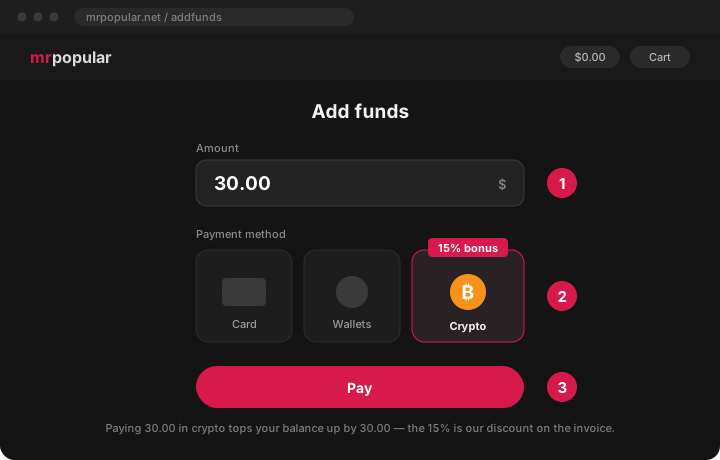
Crypto is the cheapest way to pay here: we take 15% off the invoice, so $30 on your balance costs you about $25.50 in coins. You don't need to know anything about crypto beforehand - below is the whole path from zero. Roughly ten minutes the first time, two minutes every time after.
The whole thing in three moves
Buy USDT. It is a coin pegged to the dollar: 1 USDT ≈ $1, so the amount does not drift while you pay.
Create an invoice here. Enter the amount, choose crypto - you get an address and an exact sum.
Send the coins. The balance is credited on its own, usually within minutes.
Step 1. Get USDT
Two routes below. The first is cheaper, the second is faster - pick one, you do not need both. Already holding USDT? Jump straight to step 2.
Route A - a crypto exchange
cheaper
Sign up at Bybit or OKX with an email and pass identity verification - a photo of an ID and a selfie, usually 2-10 minutes.
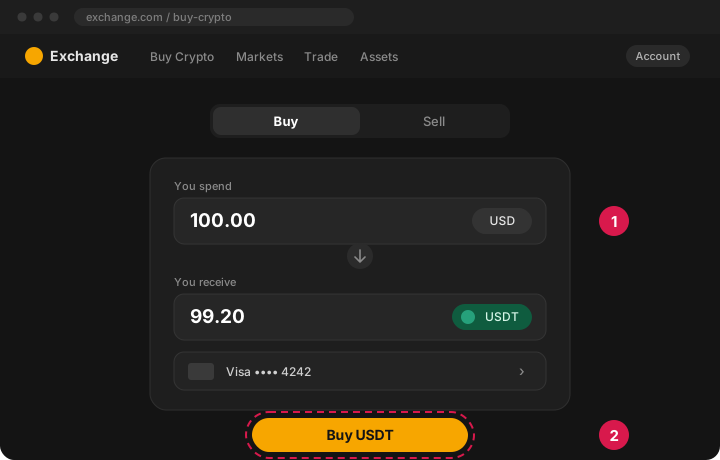
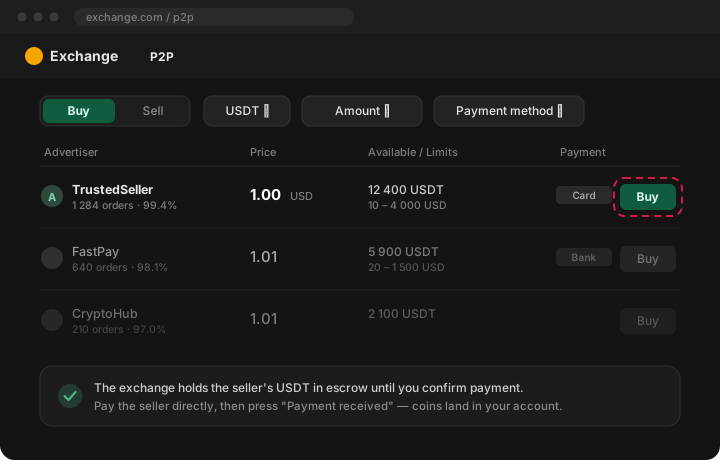
Open Buy Crypto. The simple way is a card: enter the amount, pick USDT, pay. The cheaper way is the P2P tab - you pay a seller directly by card or bank transfer while the exchange holds their coins in escrow until you confirm.
The USDT lands in your exchange account. Leave the tab open - you come back to it in step 3.
Buying USDT with a card on an exchange Illustration of the step - the real screen may differ slightly.P2P: you pay the seller, the exchange holds the coins Illustration of the step - the real screen may differ slightly.
Best rate you will get, and withdrawing over the TRC20 network costs about 1 USDT. The price is the sign-up and the ID check.
Route B - a wallet app
faster
Install Trust Wallet or Exodus, create a wallet and write the recovery phrase down on paper. Nobody is ever entitled to it - not us, not support, not anyone.
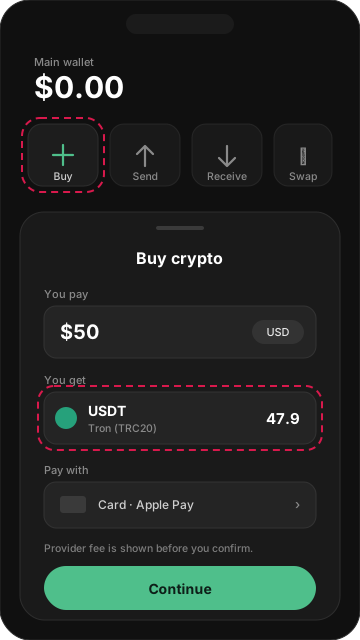
Tap Buy, choose USDT (Tron / TRC20) and pay by card or Apple Pay. Behind that button sits a provider - MoonPay or Transak - and it will still ask for a document.
The coins show up in the wallet within 5-20 minutes.
Buying inside a wallet app Illustration of the step - the real screen may differ slightly.
No exchange account needed, but the provider keeps 3-5% and the minimum is usually around $20-30. Fine for a one-off, expensive as a habit.
Step 2. Create the invoice
Open add funds and type the amount you want on your balance.
Choose Cryptocurrency as the payment method and confirm.
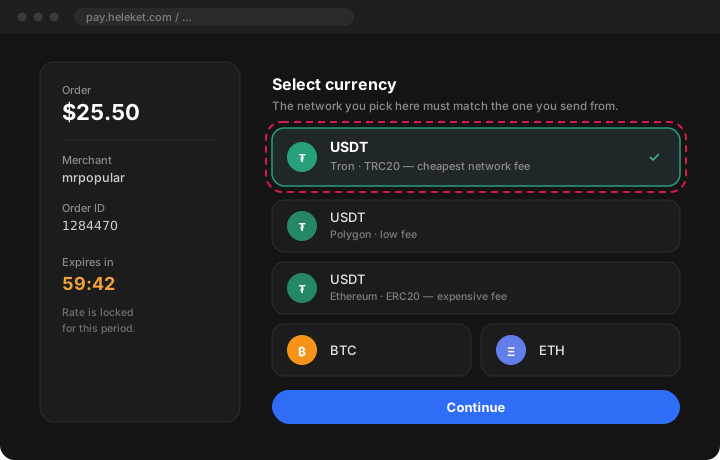
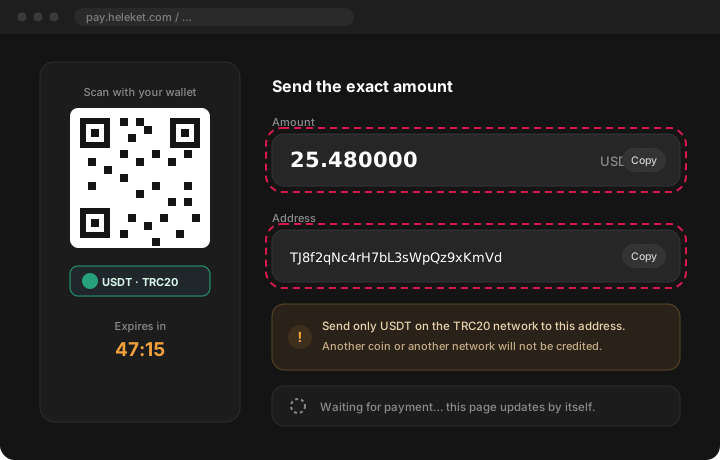
A payment page opens. Pick the coin and the network - take USDT · TRC20 unless you have a reason not to, it has the lowest transfer fee. You then get an address, an exact amount and a QR code, plus a timer: the rate is locked while it runs.
Choosing the crypto payment method Illustration of the step - the real screen may differ slightly.Picking the coin and the network Illustration of the step - the real screen may differ slightly.The address and the exact amount Illustration of the step - the real screen may differ slightly.
Step 3. Send the payment
Go back to the exchange or the wallet and open Withdraw / Send.
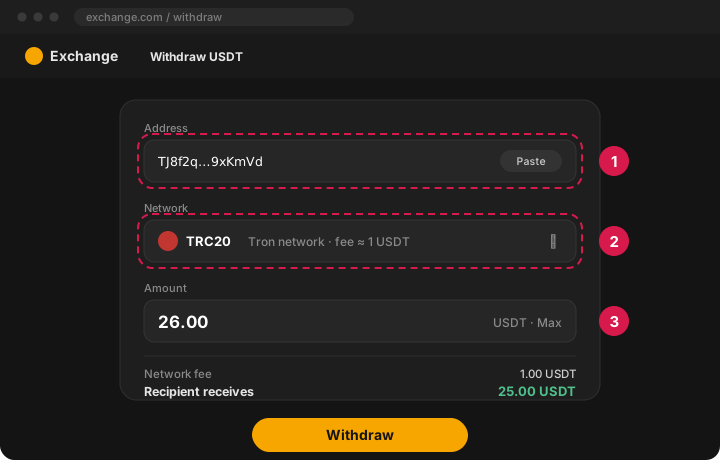
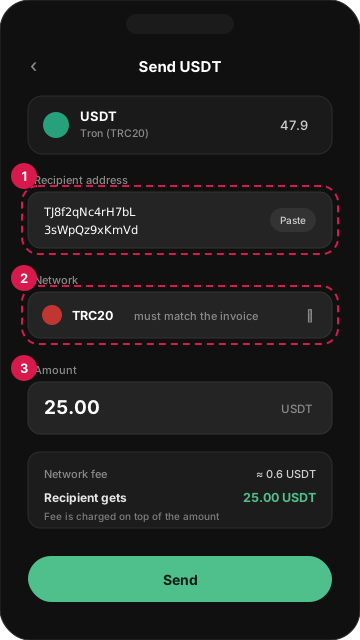
Paste the address from the payment page and set the network to the same one - TRC20.
Enter the amount, check the line showing what the recipient actually receives, and confirm.
Withdrawal: address, network, amount Illustration of the step - the real screen may differ slightly.Sending from the wallet to the invoice address Illustration of the step - the real screen may differ slightly.
The one thing people get wrong
On an exchange the network fee is taken out of the amount you type. Type the invoice amount exactly and it arrives short, so the invoice stays unpaid. Add the fee on top - or simply send 1-2% more. Overpayment is credited; underpayment is not.
Step 4. Wait for the credit
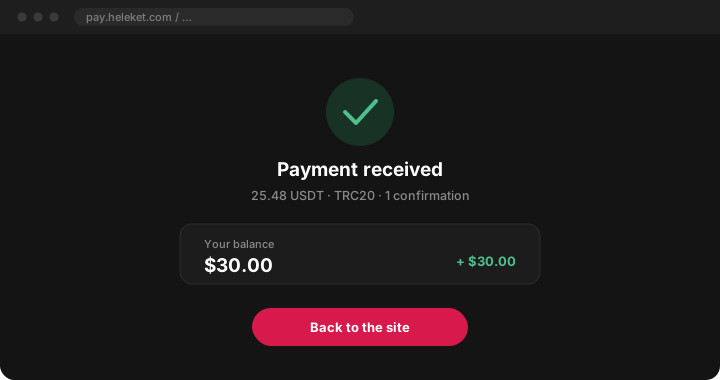
The network normally confirms in 1-15 minutes. The payment page refreshes itself and the balance appears without you doing anything. Under heavy network load it can stretch to an hour - that is normal and the money is not lost.
Payment confirmed, balance credited Illustration of the step - the real screen may differ slightly.
Mistakes that cost money
Wrong network
USDT lives on TRC20, ERC20, BEP20, Polygon, Solana and TON. They look identical and are not interchangeable. Send on the network you selected on the payment page - coins sent over another one do not arrive.
Sent less than the invoice
The withdrawal fee was deducted from your amount, so the invoice stays open. Send the difference to the same address before the timer runs out, or write to support.
The timer ran out
The rate was locked for that window only. Start over and create a new invoice - never reuse the old address.
Sent a different coin
An address belongs to one coin. BTC sent to a USDT address is not credited automatically.
Paid through a "helper"
Topping up a balance never requires your recovery phrase, your exchange password or remote access to your screen. Anyone asking for those is robbing you.
Questions people actually ask
What does this cost me?
Less than nothing: the invoice is 15% smaller than the sum credited to your balance. Beyond that you only pay your own wallet's or exchange's network fee, usually around 1 USDT.
Is there a minimum?
The gateway will not take dust - in practice start from about $10 worth. Below that the network fee eats a visible share of the transfer.
Which coin should I choose?
USDT on TRC20: the price does not move while you pay and the transfer costs around 1 USDT. USDT on Polygon is a solid second choice. Avoid ERC20 for small amounts - the Ethereum fee can exceed the payment itself.
Can I pay from somebody else's wallet?
Yes. The invoice checks the coin, the network and the amount - not who sent it.
I sent it and nothing happened.
Check the transaction in your wallet first: it has to be confirmed, on the right network, and at least the invoice amount. If all three hold and half an hour has passed, write to support with the transaction hash - the hash alone is enough to find the payment.
Do I have to verify my identity?
Not with us. The place where you buy the crypto will ask - that is the exchange's own rule and has nothing to do with your account here.